Foresight Mobile is a UK app agency that adds AI to existing iOS, Android and Flutter apps. We connect your app to OpenAI, Claude or Gemini, or run AI on the phone when privacy, offline use or token costs matter. Adding AI to an app you already have usually costs £20,000 to £40,000.
50+ apps shipped since 2017
Usually, yes, and without rebuilding it. Foresight Mobile is a UK mobile app agency, with its head office in Manchester, and most of the AI work we're asked about starts with an iOS, Android or Flutter app that's already live. The feature might summarise long documents, or let people search your content in plain English.
There are two ways to power a feature like that. Your app can send each request to a cloud model from OpenAI (the company behind ChatGPT), Anthropic's Claude or Google's Gemini, and pay per token. Or a model can run on the phone itself, using Apple's Foundation Models framework on iPhone or Gemini Nano on Android, with no per-token charge and no connection needed. Picking the right one for each feature is most of the job, and the rest of this page explains how we make that call. We've also written about how AI has changed the way mobile apps are built.
Adding AI features to an existing app usually costs £20,000 to £40,000. A new app built around AI, with on-device models, cloud fallback and compliance work included, usually costs £40,000 to £80,000. Where you land depends on how many AI features there are, how the work splits between the phone and the cloud, and how many of your systems the app has to talk to.
Cloud models bill per token (a word or part of a word, in and out), so the running cost grows with every user and every request while your subscription price stays flat. A feature that fires on every keystroke can cost many times more than one people use twice a week. On-device models have no per-token charge. On client projects where we've moved frequent AI tasks from the cloud onto the phone, running costs have fallen by 30 to 50%. That's the range we've seen, and your figure depends on how much of the work a small on-device model can take. Apple also makes its larger Private Cloud Compute model free to developers who are in the App Store Small Business Program, have fewer than two million first-time downloads and have been granted Apple's entitlement. Grow past that threshold and you have six months to move to another option.
The App Gameplan tells you what to build and what it will cost before you commit, and for an AI feature the running cost is part of that picture. It takes four weeks, the fee is a fixed £3,500, and it's credited against development if you go ahead.
It can be, though the provider's terms won't make you compliant on their own. OpenAI says data sent to its API isn't used to train its models unless you opt in. Anthropic says it doesn't train on inputs or outputs from its API by default. Apps serving users in the UK or EEA must use Google's paid Gemini API, and on paid services Google doesn't use prompts or responses to improve its products, though it logs them for a limited period.
You still need a lawful basis for sending personal data, a data processing agreement with the provider, and an answer on retention. OpenAI, for example, keeps API data in abuse-monitoring logs for up to 30 days unless it has approved you for reduced retention, and its Responses API stores conversation state for 30 days by default. Apple adds a rule of its own: App Review guideline 5.1.2(i) says you must clearly disclose where personal data is shared with third-party AI and get explicit permission before sharing it. We're not lawyers, and anything regulated should go past your data protection officer.
When the data is health records, financial details or anything else you'd rather not send anywhere, the simplest option is to keep it on the phone.
Recent flagship phones can. Most older and cheaper phones can't, so every on-device feature needs a fallback.
On iPhone, Apple's Foundation Models framework has been open to developers since iOS 26 in September 2025. It gives your app the roughly 3-billion-parameter model behind Apple Intelligence through one Swift API, with no API key and no per-token cost. It needs a device that supports Apple Intelligence: iPhone 15 Pro, iPhone 15 Pro Max, iPhone Air, or the iPhone 16 range and later, set to a supported language. Apple's documentation gives the model a context window of 4,096 tokens per session. That's small, and it limits what you can sensibly ask of it. Apps can read the limit at runtime through contextSize. The model ships with the operating system, so it adds nothing to your app's download size.
iOS 27, released on 14 September 2026, adds image input to the on-device model, Vision-backed OCR and barcode tools, and a Spotlight-powered search tool that lets retrieval-augmented generation run entirely on the phone. For work the small model can't handle, Private Cloud Compute offers a 32,000-token context with reasoning. A new LanguageModel protocol lets the same session call Claude or Gemini instead. iOS 27 also adds Core AI, a new framework for running your own AI models on Apple silicon.
On Android, Gemini Nano runs inside AICore, an operating system service, so the model isn't in your APK either. ML Kit's GenAI APIs cover summarisation, proofreading, rewriting and image description on recent flagships, including the Google Pixel 9, 10 and 11, the Samsung Galaxy S25 and S26, and the OnePlus 13 to 15. Google still labels those four APIs and its Prompt API as Beta, so budget for API changes. If you need open weights, Google released Gemma 4 in April 2026 under the Apache 2.0 licence, and its smallest versions run offline on phones.
Benchmarks usually quote a phone's peak speed. Phones only hold that speed until they warm up.
A study published on arXiv and revised in June 2026 ran a 4-bit, 1.5-billion-parameter model twenty times in a row on flagship phones. An iPhone 16 Pro peaked at 40.5 tokens per second and settled at 23.7, which is 41.5% below its peak. A Samsung Galaxy S24 Ultra settled at about 10.4 tokens per second. The twenty runs used 5% of the iPhone's battery and 7% of the Samsung's.
That slowdown tends to appear after a good demo, once real people use the feature for longer. We test sustained use on mid-range phones as well as flagships, and we design what happens on phones that can't run the model at all.
Does it need to work offline? Then it runs on the device, whatever else is true.
How often does it run? A feature that fires on every keystroke is expensive as a cloud call and nearly free on the phone. One that someone triggers twice a week is fine in the cloud.
How sensitive is the data? Health data, financial records and anything under a client's own compliance rules are far easier to handle when they never leave the handset.
How hard is the reasoning? On-device models are small. They summarise, classify, extract and rewrite well, and they struggle with multi-step reasoning over long documents, which is what the larger cloud models are for.
Most real apps end up using both, and a good share of the engineering goes into sending each request the right way. We've set out the wider trade-offs in the pros and cons of AI in mobile app development.
Yes, with more work than on native iOS or Android. We build a lot in Flutter, and neither Apple nor Google publishes an official Flutter plugin for on-device generative AI. Firebase AI Logic documents its hybrid mode, which tries the on-device model and falls back to the cloud, for Android, iOS and the web, and has no Flutter guide for it.
So on-device AI in a Flutter app means a community package or platform channels written straight against Apple's Foundation Models and ML Kit. We write the channels, and that work goes into the quote from the start.
We've shipped on-device AI features in five client apps, using Gemini Nano on Android and Core ML on iPhone. The projects below are ones we can talk about publicly.
Vaxtor makes automatic number plate recognition software. We ported it to Android as an app and SDK, in Kotlin with a C++/NDK core, so plate recognition runs on the phone's own camera feed. The work was completed in February 2021, and the SDK is used by police forces and parking operators and in Spyglass's AI-driven mobile platform. Working out which handsets could keep up was a real part of that project, because camera hardware and processing headroom vary so much between phones. Read the Vaxtor case study.
SeeChange, an Arm subsidiary, uses smart cameras and machine learning to measure how spaces are used and to detect spills and hazards in shops. We built its Insights app for mobile and web from one Flutter codebase. Read the SeeChange case study.
Rio Sustainability runs an intelligent sustainability platform that analyses organisations' data. We built its Flutter companion app. Read the Rio case study.
Foresight Mobile publishes and maintains flutter_markdown_plus, which gets more than 550,000 downloads a month and scores 160 out of 160 pub points. Its LaTeX companion adds about 28,000 more.
Language models answer in Markdown, with tables, code blocks, lists and equations, and something has to turn that into a readable screen. flutter_markdown_plus is one of the Flutter packages that does it, so we know from the inside what your app can and can't display from a model's output.
Models sometimes state wrong facts with confidence, and some users will try to talk them into misbehaving, so the app should never simply act on whatever the model returns. Answers that have to be right, such as prices, dates or anything medical, should come from your own data, with the model finding or phrasing them.
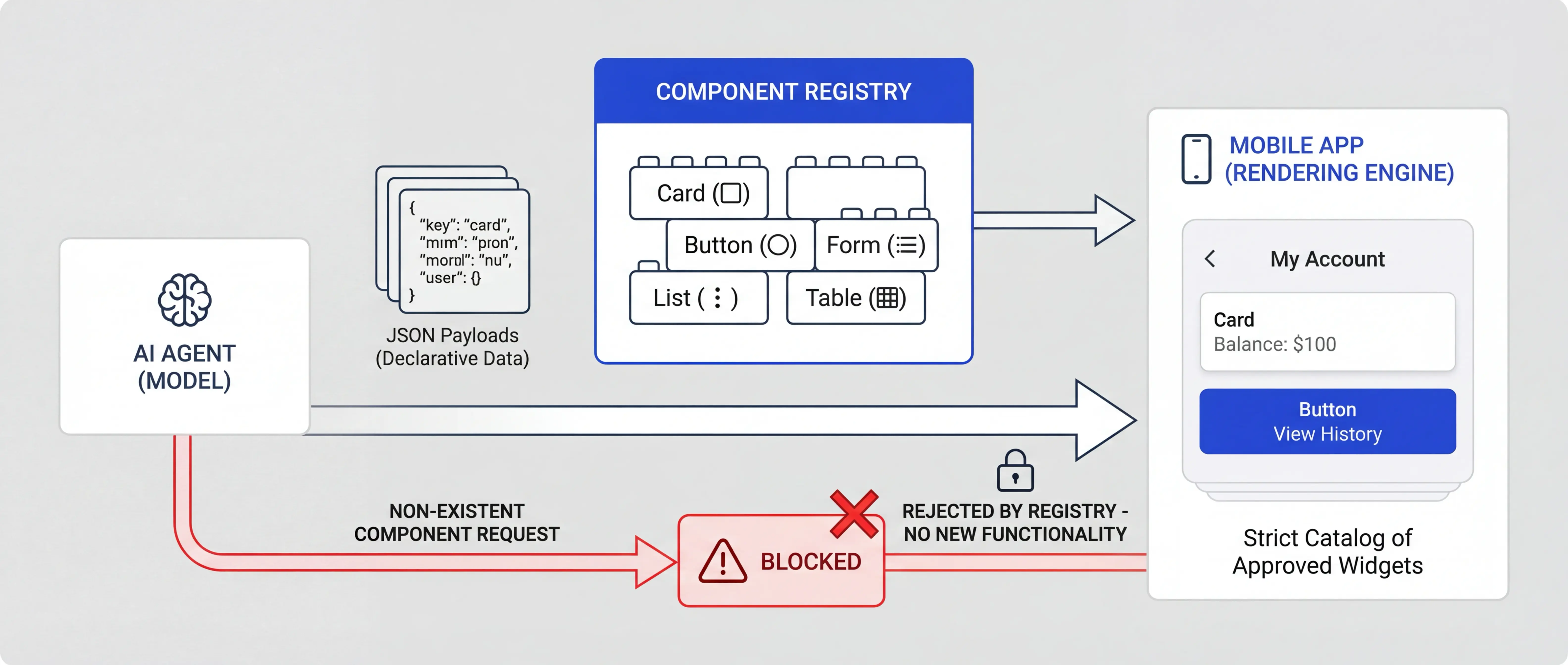
Where a model decides what appears on screen, we have it send a structured description, and the app builds the screen from a fixed registry of components you've approved. A request for anything outside the registry is ignored. The model can't inject code, because it never produces code.
Apple will if your app sends personal data to an AI provider without asking first. Guideline 5.1.2(i) requires you to disclose where personal data is shared with third-party AI and get explicit permission before sharing it. An app that sends user content to OpenAI, Anthropic or Google needs a consent step that names the provider and the data, shown before the first request goes out.
Google Play's AI-Generated Content policy covers apps that generate content with AI, including chatbots where the conversation is a central feature, image generators, and apps that create voice or video recordings of real people. Those apps need a way for users to report offensive output without leaving the app. Google says the policy isn't intended, for now, to cover productivity apps that use AI to improve an existing feature, such as AI-suggested email drafts, which is where many features added to an existing app sit.
AI features for an existing app. Summaries, plain-English search, assistants and camera features added to the iOS, Android or Flutter app you already have, using OpenAI, Claude or Gemini in the cloud, a model on the phone, or both.
On-device AI to cut token costs. Moving frequent tasks such as summarising, proofreading and classifying off cloud APIs and onto Gemini Nano or Apple's on-device model, with a fallback for phones that can't run them. For high-volume apps, those tasks are usually where the cloud bill comes from.
AI consent and app store review. A check of your app's AI features against Apple's guideline 5.1.2(i) consent rule and against the scope of Google Play's AI-Generated Content policy, before you submit.
AI projects go wrong when building starts before the basics are answered: which features run on the phone, what happens on phones that can't run the model, and what the token bill looks like at ten times today's usage.
The App Gameplan works through what to build and what it will cost in four weeks, for a fixed £3,500. You get a technical feasibility assessment, an architecture and integration plan, a prioritised feature roadmap and a fixed-cost development quote, and the fee is credited against development if you go ahead. If you'd like to talk it through first, get in touch.
Written by Gareth Reese, Founder and CTO of Foresight Mobile in Manchester. Gareth leads Foresight's AI work and maintains the flutter_markdown_plus open-source package.
An actionable four-week plan with clear deliverables and an unbeatable £3,500 price point, credited against your first development sprint.
Total client time commitment: 5-7 hours across 4 weeks
We meet with your key stakeholders to understand your business goals, user needs, and technical constraints. You'll share any existing research, designs, or documentation you have.
Our engineering team assesses the technical feasibility, identifies integration points with your existing systems, and evaluates architecture options.
We determine whether Flutter, native development, or another approach makes the most sense for your specific requirements.
We create clickable prototypes so you can experience your app before it's built. You'll test navigation flows, validate the user experience, and gather feedback from stakeholders.
Alongside this, we prioritise features based on business value and technical complexity, mapping out a phased delivery plan with a detailed cost estimate.
You receive your complete Gameplan pack, plus a presentation walkthrough with Q&A. Your team walks away with everything needed to make a confident decision.
Why UK businesses ask Foresight Mobile to add AI to their apps

AI models answer in Markdown, with tables, code and equations, and your app has to display that properly. Foresight Mobile maintains flutter_markdown_plus, a Flutter package that does it, with more than 550,000 downloads a month. If AI output looks wrong in your app, you're talking to the people who maintain the code.

You'll work with a UK team whose head office is in Cheadle, Greater Manchester. We're in your time zone and happy to meet in person, which helps when you're deciding where your users' data goes, reviewing a provider's terms, or working through how a model behaves with your real content.

Some users will try to talk an AI feature into misbehaving, and models sometimes get facts wrong. When a model decides what appears on screen, it chooses from a registry of components you've approved, so it can't inject code or invent new functionality. Facts that have to be right, such as prices and dates, should come from your own data.

Cloud AI bills per token, so the cost rises with every user while your prices stay flat. We move frequent, simple tasks onto the phone, where Gemini Nano and Apple's on-device model have no per-token charge, and keep the cloud for requests that need it. On client projects that made this move, we've seen AI running costs fall by 30 to 50%.

Apple can reject an app that sends personal data to third-party AI without explicit permission, so we build the consent step in from the start, shown before the first request goes out. We also check whether Google Play's AI-Generated Content policy covers your feature, and if it does, add the in-app reporting it requires.
On-device models keep working with no signal and keep sensitive data on the phone. We use Apple's Foundation Models framework on iPhone and ML Kit's GenAI APIs with Gemini Nano on Android, with a fallback for phones that can't run them. In Flutter apps we write the platform channels ourselves.

Most AI features can be added to the app you already have. We work in your existing iOS, Android or Flutter codebase and connect the feature to OpenAI, Anthropic's Claude or Google's Gemini, to a model on the phone, or to both. Your users get the new feature in an ordinary app update, and you keep your existing app and its App Store listing.
The ones that save your users time on something they already do in the app. Summarising long content, search that understands plain English, filling in forms from a photo, and suggested replies all fit that description.
A lot of people are tired of AI features they never asked for, so a chat window added because competitors have one rarely gets used. We'd start with the task in your app that takes users longest or where they drop off, and ask whether a model makes it faster. Put the feature where that task happens, make it easy to ignore, and measure whether people use it. If a feature needs a cloud model and runs constantly, check the token cost per user against what that user pays you. The App Gameplan helps you decide what to build before you commit.
Apple can reject it if the app sends personal data to an AI provider without asking first. Guideline 5.1.2(i) says you must clearly disclose where personal data will be shared with third parties, including third-party AI, and get explicit permission before doing so.
In practice, an app that sends user content to OpenAI, Anthropic or Google needs a consent screen that names the provider and the data, and no request can go out before the user agrees. That includes the first time someone opens the AI feature. Getting the order of events wrong in code is enough for a rejection even when the consent screen exists. On-device models such as Apple's own Foundation Models don't send data to a third party. Google Play has a separate AI-Generated Content policy for apps that generate content with AI, including chatbots, image generators and apps that create voice or video of real people. Google says it isn't intended, for now, to cover productivity apps that use AI to improve an existing feature.
Yes, but it takes more work than in a native app. Neither Apple nor Google publishes an official Flutter plugin for on-device generative AI, and Firebase AI Logic documents its hybrid on-device-with-cloud-fallback mode for Android, iOS and the web, with no Flutter guide.
So there are two routes: a community package, or platform channels written directly against Apple's Foundation Models framework on iOS and ML Kit's GenAI APIs on Android. We write the channels, which gives you control over the fallback and over API changes. Budget for them from the start. Calling cloud models from OpenAI, Anthropic or Google from Flutter is simpler, since it's an ordinary network request, usually through your own server. We build a lot in Flutter, and we maintain flutter_markdown_plus, a package for displaying Markdown, the format models answer in.
It will if it runs on the phone. Features built on Apple's Foundation Models framework or Gemini Nano run on the device, so they keep working with no signal. Features that call OpenAI, Claude or Gemini in the cloud need a connection.
If offline use matters, we design the feature around what a small on-device model can do: summarising, extracting details, classifying and rewriting short text. Anything that needs a larger model waits until the phone is back online, and the app tells the user that's what is happening. Remember that on-device models only run on recent phones, so users on older handsets get the cloud version or no AI feature. We decide that fallback with you before building.
OpenAI doesn't train on data sent to its API unless you opt in, Anthropic doesn't train on API data by default, and Google doesn't use prompts or responses from its paid Gemini API to improve its products. None of that makes your app GDPR compliant by itself.
You still need a lawful basis for sending personal data, a data processing agreement with the provider, and a retention position: OpenAI keeps API data in abuse-monitoring logs for up to 30 days unless it approves you for reduced retention, its Responses API stores conversation state for 30 days by default, and it offers European data residency to approved customers. Apps serving users in the UK or EEA must use Google's paid Gemini API, where Google doesn't use prompts or responses to improve its products but does log them for a limited period. Apple separately requires explicit user permission before personal data goes to a third-party AI. We're not lawyers, so have your data protection officer sign off anything regulated. For health or financial data, an on-device model keeps it off third-party servers altogether.
Yes. ChatGPT itself is a consumer product, so apps use the model behind it through the OpenAI API, and the same applies to Anthropic's Claude API and Google's Gemini API. We connect your iOS, Android or Flutter app to whichever fits the feature, usually through your own server, so API keys never ship inside the app.
Apple's guideline 5.1.2(i) requires you to tell users their personal data is going to a third-party AI and to get explicit permission before sending it, so the integration includes a consent step. Because you pay per token, we estimate the monthly cost first, and we plan for the day the provider retires the model you built on. On iPhone, Apple's new LanguageModel protocol lets the same code call Claude or Gemini, which makes switching between providers easier.
By moving the frequent requests onto the phone. Cloud models from OpenAI, Anthropic and Google charge per token, so one user action that triggers several model calls can cost far more than it looks, and that cost grows with every user while your subscription price stays flat.
We look for requests that run often and are simple, such as summarising, classifying or rewriting short text, and run those on Gemini Nano or Apple's on-device model, which have no per-token charge. The cloud model handles only what needs it. On client projects that made this move, we've seen AI running costs fall by 30 to 50%, though your figure depends on how much a small on-device model can do for your feature. Once live, we monitor token spend so you see a rise before the invoice does. On iPhone, Apple's Private Cloud Compute model is also free to developers in the App Store Small Business Program with fewer than two million first-time downloads and Apple's entitlement.
Yes, in most cases. We add AI features to iOS, Android and Flutter apps that are already live, working in your existing codebase. The feature ships in a normal app update, and you keep your app, your users' data and your store listings.
What we need to decide first is where each feature runs. A cloud model from OpenAI, Anthropic or Google handles harder reasoning and works on any phone, but you pay per token and need a connection. An on-device model, Apple's Foundation Models framework or Gemini Nano, costs nothing per request and works offline, but only on recent phones. A rebuild only comes into it when the app itself is in poor shape, and in that case we'd tell you before quoting. The App Gameplan answers this for a fixed £3,500, credited against development.
By never letting the app act on a model's raw output. Facts that have to be right, such as prices, dates, account details or anything medical, should come from your own data, with the model only finding or phrasing them.
For misuse, the main risk is prompt injection: a user or a document tells the model to ignore its instructions. Where a model decides what appears on screen, it sends a structured description, and the app builds the screen from a fixed registry of components you've approved. Anything outside the registry is ignored, and the model can't inject code because it never produces code. We also keep the model's permissions narrow, so a successful injection can't reach anything sensitive, and we test the feature with the kinds of prompts users actually try.
Language models answer in Markdown, and flutter_markdown_plus is a Flutter package that turns Markdown into a readable screen. Foresight Mobile publishes and maintains flutter_markdown_plus, which gets more than 550,000 downloads a month and scores 160 out of 160 pub points.
Model answers contain tables, code blocks, lists and sometimes equations, and a plain text widget shows them as raw symbols. Our package renders them properly, and its LaTeX companion handles equations. If your AI feature is in a Flutter app and the output displays wrongly, we can fix it in the package itself as well as in your app.
Some did. The Digital Omnibus on AI, Regulation (EU) 2026/1744, came into force on 27 July 2026. It moved high-risk obligations under Annex III to 2 December 2027, and Annex I systems embedded in regulated products to 2 August 2028.
The Article 50 transparency duties kept their date and have applied since 2 August 2026. The Omnibus added one transition: providers of generative AI systems that were already on the market before 2 August 2026 have until 2 December 2026 to meet the Article 50(2) duty to mark AI-generated content. The same date brings two new prohibitions: AI systems that generate sexually explicit or intimate images, video or audio of an identifiable person without their consent, and AI systems that generate child sexual abuse material.
For an existing app, that means checking now that users are told when they're dealing with an AI, and that generated content will be marked by 2 December. We can review your app against both.
It depends on four things: whether the feature must work offline, how often it runs, how sensitive the data is, and how hard the reasoning is. Offline or sensitive usually means the phone. Long, multi-step reasoning means the cloud.
On-device models such as Gemini Nano and Apple's Foundation Models model are small. They're good at summarising, classifying, extracting and rewriting, cost nothing per request and keep data on the handset. Apple's on-device model has a 4,096-token context window per session, so long documents won't fit. Cloud models from OpenAI, Anthropic and Google handle harder reasoning and broader knowledge, and bill per token. Most apps use both, with frequent simple tasks on the phone and the rest sent to the cloud, plus a cloud fallback for phones that can't run the on-device model.
After a four-week App Gameplan, adding AI features to an existing app typically takes 10 to 14 weeks. Moving existing cloud AI work onto the phone takes 12 to 16 weeks, and a new app built around AI takes 4 to 7 months.
The discovery phase matters more for AI than for most app work. Whether a feature runs on the phone or in the cloud, what the fallback is for phones that can't run the model, what it will cost to run, and which consent rules apply all shape the build, and changing them halfway through is expensive. Timelines move with the number of AI features, the state of your existing codebase, and how much testing on real devices the on-device work needs.
Adding AI features to an existing app usually costs £20,000 to £40,000. A new app built around AI, with on-device models, cloud fallback and compliance work, usually costs £40,000 to £80,000.
The build cost depends on how many AI features you want, how the work splits between the phone and the cloud, and how many of your systems the app connects to. Running costs sit on top: cloud models bill per token, so the monthly bill grows with usage, while on-device models have no per-token charge. Apple's Private Cloud Compute model is free for developers in the App Store Small Business Program with fewer than two million first-time downloads and Apple's entitlement. The App Gameplan gives you a fixed-cost development quote after four weeks, for £3,500 credited against development.
Yes, if the app is available in the EU or its AI output is used there. Article 2 covers providers placing AI systems on the EU market wherever they're established, and providers and deployers outside the EU whose AI output is used in the Union. A UK company's app in the EU App Store or Play Store is in scope.
What applies depends on what the AI does. Prohibited practices, such as manipulative techniques and emotion recognition in the workplace, have been banned since February 2025. The Article 50 transparency duties have applied since 2 August 2026: people must be told when they're interacting with an AI system, and providers of systems that generate text, images, audio or video must mark that output as AI-generated in a machine-readable way. Most apps that add AI features sit at this level. The high-risk rules cover areas such as employment, education and law enforcement, and usually don't apply to them.
Recent flagships. On iPhone, Apple's on-device model needs a device that supports Apple Intelligence: iPhone 15 Pro, iPhone 15 Pro Max, iPhone Air, and the iPhone 16 range or later, set to a supported language. On Android, ML Kit's GenAI APIs running Gemini Nano support phones including the Google Pixel 9, 10 and 11, the Samsung Galaxy S25 and S26, and the OnePlus 13 to 15, plus models from several other manufacturers.
That means many of your users, often most of them, can't run it yet. Before building, we check your analytics for the share of users on supported devices and design a fallback for everyone else: a cloud model, a simpler feature, or a clear message. On Android the model lives in AICore, an operating system service, and on iPhone it ships with iOS, so neither adds to your app's download size.
Many AI projects start by wiring a chat window to the OpenAI API. That can be the right answer, and it can also leave you with a token bill that grows with every user and a feature nobody asked for. We've shipped on-device AI features in five client apps, using Gemini Nano and Core ML, and on client projects that moved frequent tasks onto the phone we've seen AI running costs fall by 30 to 50%.
We start from what the feature should do, then choose where it runs: a cloud model from OpenAI, Anthropic or Google when it needs the larger model, or an on-device model, Gemini Nano on Android or Apple's Foundation Models framework on iPhone, when it has to work offline, keep data on the phone or run constantly. Many apps use both, with a fallback for phones that can't run the model.

We look at what the feature has to achieve and who will use it, then test whether an on-device model can do it or it needs a cloud model. We look at what the feature will cost to build and to run, check what personal data would leave the phone and on what terms, and identify which Apple and Google Play rules apply. For most clients this happens inside The App Gameplan, so you get a fixed-cost quote before development starts.

We pick the model for each feature: Apple's Foundation Models framework or Gemini Nano through ML Kit on the phone, or a cloud model from OpenAI, Anthropic or Google. We design the fallback for phones that can't run the on-device model, the consent step Apple's guideline 5.1.2(i) requires before data goes to a third-party AI, and the checks that stop the app acting on a wrong answer.

We add the feature to your existing codebase, writing platform channels for Flutter apps. Testing covers mid-range phones as well as flagships, because phones slow down as they heat up under repeated use. We measure response time, memory use and battery drain over sustained use, test the fallback path, and check what the app does when the model returns something unexpected.

We monitor response times, how often requests fall back from the phone to the cloud, error rates and token spend, so you can see whether the feature is working and what it costs. Providers retire older models and Apple and Google change their AI APIs with each major OS release, so we track those changes through App Care and update the app when they do.
Your app, your way. Here's how we make it happen
You start with a £3,500 fixed-price Gameplan that tells you what to build and what it will cost, and ends in a fixed-cost development quote. The fee is credited against development if you go ahead, so the discovery costs you nothing extra when you build with us.
AI APIs change quickly. Providers retire older models, and Apple and Google update their on-device AI APIs with new OS releases. App Care retainers from £675 a month cover tracking those changes and keeping your AI features working.
We maintain flutter_markdown_plus, which displays Markdown, the format language models answer in, in Flutter apps. It gets more than 550,000 downloads a month, so we know how model output renders on real phones.
We've shipped on-device AI features in five client apps, using Gemini Nano and Core ML. That's taught us how models behave on the phones your users actually own, including what to do on the ones that can't run them.
Foresight Mobile has built iOS, Android and Flutter apps since 2017. AI features go into apps that have to pass App Review, run on older phones and keep working after OS updates, and that's the work we've done for nearly a decade.
Our head office is in Cheadle, Greater Manchester, with offices in Birmingham and London. Talking through AI features face to face tends to settle questions about data and cost faster than email, so get in touch to arrange a visit.



Foresight Mobile effectively and promptly met our needs. They were a candid, reliable, and collaborative partner.
“They’re more thoughtful than any other development team I’ve worked with..... I’m not sure what they could improve."

"The team has delivered exactly what we asked for but is able to use their own skill and judgment to make improvements"

"Foresight Mobile effectively and promptly met our needs. They were a candid, reliable, and collaborative partner."