Tech
How to Transfer a Base44 or Lovable App Into Your Own Account: What Moves and What Stays Behind

October 6, 2026
Taking over a Base44 or Lovable app?
Tell us which platform it's on and who holds the accounts today, and we'll reply within one working day with what to check before anything moves.
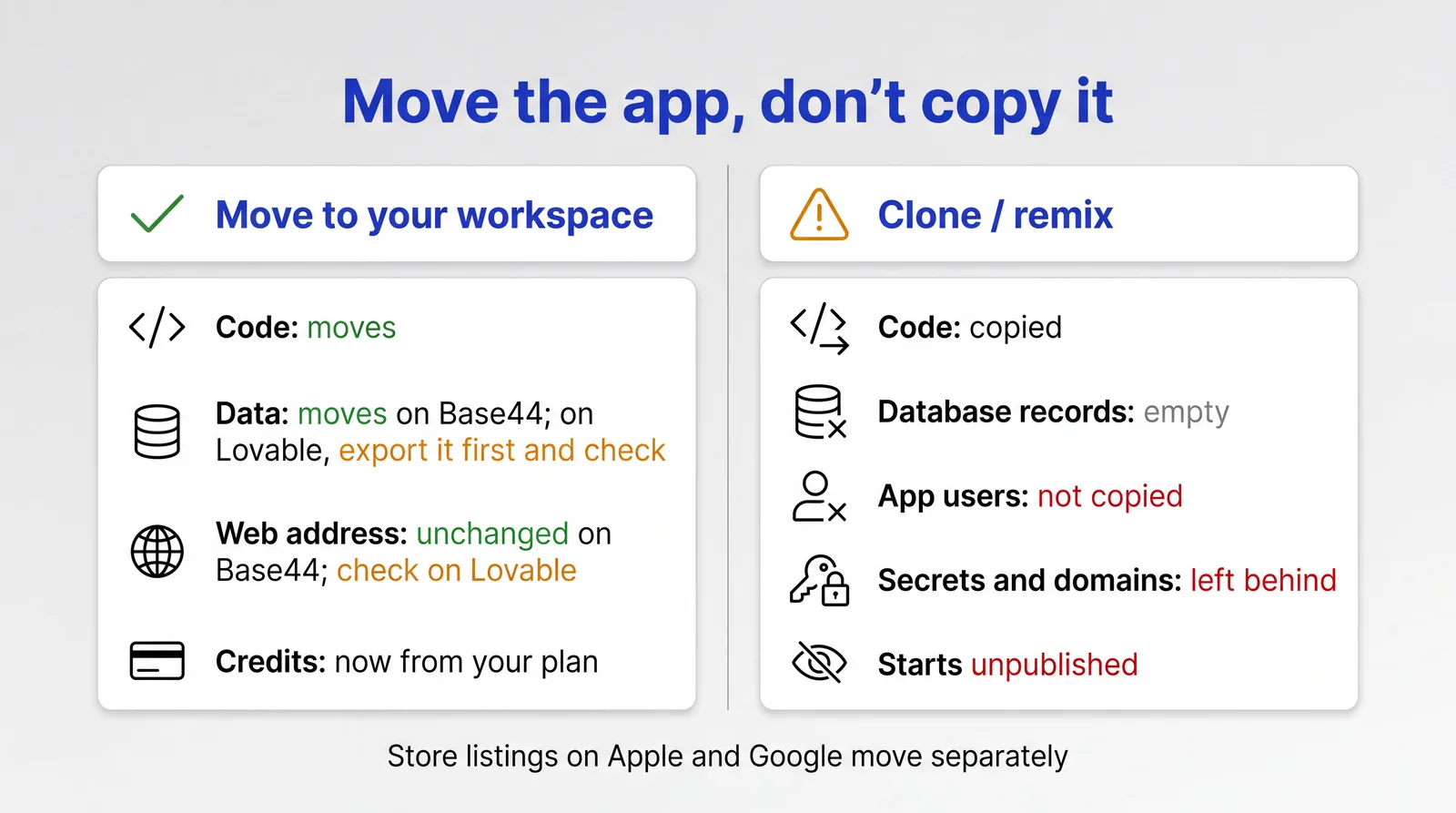
Get a free checkIf a freelancer or agency built your app in Base44 or Lovable, it's probably sitting in their workspace, running on their plan. Both platforms let you move it into a workspace you own. Done the right way, a Base44 app keeps its data and users, and so does a Lovable app, once you've checked where its database lives. Which route you take decides it. Being made the app's "owner" inside your developer's workspace doesn't move it, and copying the app (Base44 calls this cloning, Lovable calls it remixing) gives you the code with an empty database. So: open your own workspace, have the app moved into it, then take ownership.
This is a different job from moving the app's App Store or Google Play listing. If your developer published the app under their own Apple or Google account, that's a second transfer, covered in our guide to moving an app into your own developer accounts.
On both platforms the workspace, not the person, pays for the app. Base44's docs say apps "always belong to the workspace where they were created and use that workspace's plan and credits regardless of who is working on them". Lovable says credits "belong to the workspace that owns the project".
So if your developer makes you the app's owner but the app stays in their workspace, they still hold the plan it runs on, and their workspace owners keep access to it. Most guides online describe only that step. It's fine between two people in the same company. For a handover between businesses, the app needs to move workspace first.
Sign up for the platform with your business email and use the workspace it creates for you, or create a new one. Then check the plan.
On Base44, a Free workspace can only receive an app if it has fewer than five apps, and connecting a custom domain needs the Starter plan or higher (Base44's plans as of October 2026). On Lovable, custom domains need a paid plan, and moving a domain bought through Lovable needs Pro or above. Once a Lovable app is in your workspace, its Lovable Cloud database and sign-in run on your credits, and Lovable pauses them shortly after a workspace runs out, so put a live app in a paid workspace.
Then invite your developer into your workspace with an editor role. Both platforms say the person moving an app has to be a member of the destination workspace: on Lovable, "you need to be a member of that workspace with permission to create projects there".
Base44 documents two separate steps: move the app, then change the owner.
1. Your developer checks they can move it out. They need to be the owner of their own workspace (or an admin on an Enterprise plan), and app transfers have to be allowed there. Apps bought from someone else can't be moved.
2. You give them, and the app's current owner, an editor role in your workspace. If someone other than your developer owns the app, they need editor access in your workspace too.
3. They move it. From the app's dashboard: Overview, the More actions menu next to View usage, Move app, then pick your workspace and confirm. Developers who use Base44's command line can run base44 workspace move instead.
4. They make you the owner. In the editor they open the Invite collaborators panel, invite you to the app as a collaborator, then choose Make app owner from the menu next to your name. At this step they decide, for each connected service, whether to keep it or disconnect it, and whether they stay on as a collaborator.
5. You accept. The transfer only takes effect once you do.
6. Decide whether your developer keeps access. Once you own the app, lower their role or remove them from your workspace.
According to Base44, the app's data and settings move with it. Its Base44 address doesn't change and you don't need to publish again. From then on it draws credits from your workspace.
Base44 also has a direct transfer to someone outside the workspace, from Settings, Danger Zone, Transfer Ownership. It's only available to Enterprise workspaces and approved Base44 Partners, and the new owner has seven days to accept. Most freelancers won't have it, which is why the route above goes through your workspace.
Lovable has the same two steps under different names.
1. Invite your developer into your workspace with an editor role or above.
2. Export the database first. If the app uses Lovable Cloud, your developer can download a full copy of the database from Cloud, Overview, Advanced settings, Export data. It's your copy if anything goes missing in the move.
3. They move the project. In Project settings, the Move workspace row, then Move, and pick your workspace. They can also do it from the project card on the dashboard (Move, then To workspace). They can move projects they own. On Enterprise workspaces the owner also needs the Editor project transfers setting turned on. Lovable's automated fraud checks can also block a move.
4. They transfer ownership to you. Project settings, Transfer ownership, then pick your name. You have to be an active member of the workspace with an owner, admin or editor role.
5. Decide whether your developer keeps access. If you remove them from your workspace, any project they still own passes to another member, though projects set to Restricted don't.
Lovable says a moved project keeps its history and settings. Three things change. People invited only to that project are removed unless your developer ticks Transfer project collaborators. The project drops out of its folder. Its access setting resets to your workspace's default, so check Project access afterwards if it should be restricted.
Lovable's docs don't say in so many words what happens to the built-in database (Lovable Cloud) during a move. Open the Cloud view straight afterwards and check your tables and your user list are all there.
Some Lovable apps don't use Lovable Cloud. They connect to a Supabase project of their own, and that project, with your data and your users, sits in whoever's Supabase account created it. Moving the Lovable project doesn't move it. Supabase lets the owner of the developer's Supabase organisation transfer the project into an organisation you own, as long as they're also a member of yours. You then link that organisation to your Lovable workspace and reconnect the project. Ask your developer which kind your app uses before you start.
If the developer bought a domain through Lovable, it's a workspace domain, so it has to be moved too: Workspace settings, Workspace domains, Configure, then Move domain. Whoever does it must be an admin or owner of your workspace, so you may need to raise your developer's role for that step and lower it again afterwards. Moving the domain disconnects it from the app, so reconnect it straight away from the project's domain settings and expect a short gap. Then update the registrant contact details to yours.
If your developer set up a Lovable workspace just for your app, there's a shortcut: they can make you the workspace's primary owner. They stay an owner too, so remove them afterwards if you want sole control.
Lovable's own help page on moving a project "to another account" describes remixing: the old account turns on public remixing, the new account opens the link and makes a copy. Base44's clone is similar. Both are fine for a prototype nobody uses yet. For a live app they leave most of it behind.
According to Lovable, a remix copies your code and your database structure. It doesn't copy the data in the database or your app's users, the version history, secrets such as API keys, custom domains, or Git and connector connections, and the copy starts unpublished. Base44 says a cloned app "starts with an empty database" and its integrations need reconnecting.
A copy is the same app with none of its customers. If people already sign in to yours, have it moved instead.
A workspace move covers what lives inside Base44 or Lovable. Plenty of what your app depends on lives somewhere else.
Your App Store and Google Play listings stay where they are. Base44 builds the files for the stores, but you upload them through your own Apple and Google developer accounts, and Base44 says it "does not create or manage your developer accounts". If your developer submitted the app from theirs, it needs an Apple and Google app transfer.
Nor does the domain registration. Domains bought through Base44 now mostly come from Wix (older ones from GoDaddy or IONOS), and Base44 says the domain belongs to whoever bought it. A Wix domain stays on your developer's workspace even after the app moves, and Base44 can't move it to another Base44 account. The developer has to transfer it out to a registrar you hold an account with, which isn't possible in the first 60 days after it was registered. You then connect it to the app from your workspace.
Stripe and other connected services stay in whoever's name they were set up in. When a Base44 owner hands an app over, they choose which connected services to keep or disconnect. Either way, a Stripe account in your developer's name is still theirs. Our post on Base44 and Stripe covers why digital purchases in an iPhone app need Apple's in-app purchase anyway.
API keys and other secrets need the same treatment. If they were issued to your developer's accounts, reissue them from yours and replace them in the app. On Base44 that includes the App Store Connect key and push credentials saved in the Mobile app tab: replace them with your own using Replace, and ask the developer to revoke theirs.
GitHub needs reconnecting too. Base44 disconnects GitHub sync when an app changes workspace, and a repository connected from your developer's workspace may not reconnect from yours, in which case Base44 creates a new one. Only the app owner can connect it, so do this after you've accepted ownership. Two-way sync needs the Builder plan or higher. On Lovable, a repository transferred to another GitHub account or organisation keeps syncing when your workspace has a GitHub connection for the new owner.
Moving workspaces keeps you on Base44 or Lovable. Leaving is a bigger job. Lovable says there's "no one-click migration" from Lovable Cloud to your own Supabase project. Its data export includes the whole database, including users and their password hashes, so people keep their passwords if you restore it into Supabase. Storage files, Edge Function code and secrets aren't in the export, and you have to move those separately. Exports are limited to databases up to 15 GB and files up to 5 GB, and you can run one every 24 hours. Base44 lets you export the code (through GitHub, a ZIP or its eject command) and download your tables as CSV files, but the backend, sign-in and uploaded files stay on Base44 and take more work to move. Our Lovable to the App Store post covers what that backend question means for a mobile app.
Do the workspace move first either way, so the app runs on your account while you decide what comes next.
We take on apps built in Base44 and Lovable and get them ready for real users and the app stores. If you're about to take an app over from a developer, start with a free check. Tell us about the app and we'll tell you what to check before anything moves.
Yes. The app's developer moves it into your workspace (Overview, More actions, Move app), then makes you the owner from the collaborators panel, and you accept. Its data and settings move with it. A direct transfer to someone outside the workspace is only available to Enterprise workspaces and approved Base44 Partners.
Invite the developer into your workspace, have them move the project there from Project settings, Move workspace, then have them transfer ownership to you. Lovable also describes remixing as a way to move a project between accounts, but a remix leaves the database records, users, secrets and custom domains behind.
On Base44, no: Base44 says data and settings move with the app. On Lovable, the docs say a moved project keeps its history and settings but don't mention the Cloud database, so export it first and check it afterwards. If the app uses its own Supabase project, the data stays in that Supabase account until it's transferred separately. A clone or remix starts with an empty database.
On Base44, no: the Base44 address stays the same and a connected custom domain keeps working if your plan supports custom domains. The domain registration itself stays with whoever bought it, so get it transferred to you separately. On Lovable, a domain bought through Lovable has to be moved between workspaces separately, and the move disconnects it until you reconnect it.
On Base44, a Free workspace can receive an app if it has fewer than five apps, but connecting a custom domain needs the Starter plan or higher. On Lovable, custom domains need a paid plan, and moving a domain bought through Lovable needs Pro or above. Once the app is in your workspace, its Lovable Cloud database and sign-in run on your credits, and Lovable pauses them shortly after a workspace runs out, which is why a live app belongs in a paid workspace.