Tech
Who Owns Your App? How to Move It Into Your Own Apple and Google Play Accounts

October 6, 2026
Moving your app away from your developer?
We'll check what's in whose name, set up the transfers with you and the outgoing developer, and ship the next update from your own accounts. Tell us where things stand and we'll reply within one working day.
Plan the handoverIf a developer or agency published your app from their own account, you can move it into yours. Apple and Google both have an official app transfer. The app stays on sale while it moves and keeps its reviews and ratings. The catch is that whoever holds the account now has to start the transfer. So do it in this order: set up your own developer accounts, get the current owner to start the transfer, then collect everything else the app depends on.
We hear this regularly. One founder's developer took a year to build their app, then only replied when the founder chased, and when the code finally arrived it had no history and no documentation. A start-up weeks from onboarding its first corporate customers spent weeks chasing its developer for its own source code, and never did get access to the server it ran on. More and more new clients now ask up front that every account stays in their name, and they're right to.
Open your app's App Store page and look at the Seller in the Information section. Apple's enrolment rules say an organisation's name "will be displayed as the seller name of your apps on the App Store". Google Play shows a developer name on the listing, though the developer chooses that name, so it tells you less. If the seller is your developer's company, or a person's name that isn't yours, the app is in their account.
Which of three situations you're in decides the route.
If the app is in your account but a supplier holds the top role, you're in the easiest position. On Apple, the Account Holder of an organisation's membership can hand the role to "another employee on the team who has the legal authority to bind your organization to legal agreements". The new Account Holder verifies their identity and signs Apple's transferee agreement. On Google Play, the account owner can make another existing user the owner from Users and permissions. Google holds the change for seven days, and the new owner verifies their identity. One catch: someone who already owns a Play Console account can't take over a second one. No app has to move in either case.
If the app is in your developer's organisation account, it has to be transferred to yours. Their account holder starts it and yours accepts it.
If it's in your developer's personal account, that's also an app transfer. On Apple, don't try to take over the account itself. Apple only moves the Account Holder role on an individual membership when a minor comes of age or the Account Holder has died, and even then only through Apple Developer Support.
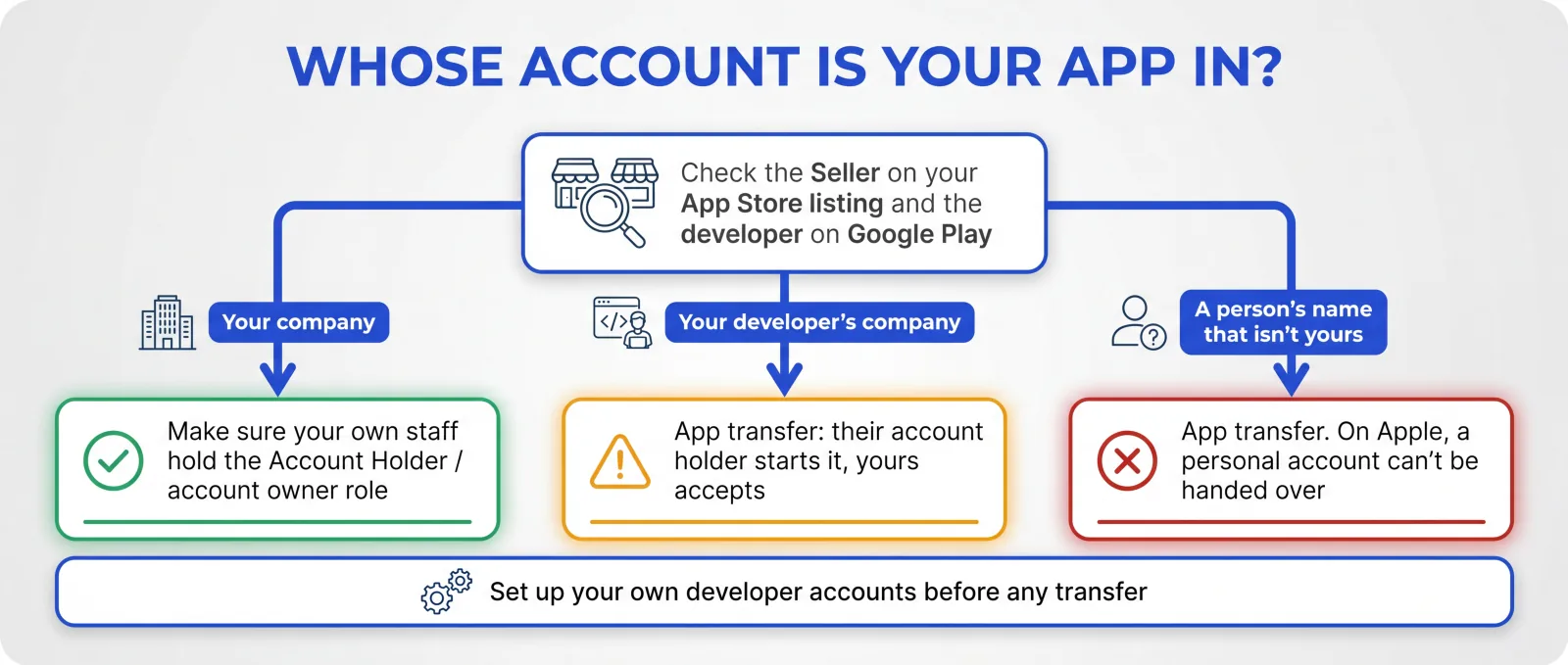
Neither store can move an app into an account that doesn't exist yet, so open yours before you ask for anything.
On Apple, enrol as an organisation so the listing shows your company. You'll need a legal entity that can sign contracts with Apple (it doesn't accept trading names or branches), a D-U-N-S Number, and the authority to act for the business. Membership is 99 USD a year, charged in local currency. Apple checks enrolment, so allow time for it. A transfer can't go through while your account is still being set up.
On Google Play, create an organisation account. Google asks for your D-U-N-S number, organisation name, address, phone number and website, plus a one-off 25 USD registration fee.
Then make sure someone inside your business is the account owner on both, with two-factor authentication turned on. Add your developers as users with the access they need.
Apple's process has two halves. Your developer's Account Holder does the first and yours does the second.
1. Check the criteria. Neither account can be in a pending or changing state, so your new account needs to have finished enrolment. Both need to have accepted the latest paid and free agreements. If your developer has accepted Apple's EU Alternative Terms Addendum, you'll need to accept it too. The app needs at least one version released on the App Store, can't be on pre-order, and can't be in review or waiting for release. In-App Purchases need to be approved, ready to submit, removed from sale or rejected, and their product IDs can't clash with any in your account.
2. Clear the blockers. Your developer turns off TestFlight testing for every beta version and removes any Xcode Cloud data. If the app sells auto-renewable subscriptions, they generate an app-specific shared secret and give it to you. Ask them for a sales export too, because sales history from before the transfer stays with them.
3. The current owner starts it. In App Store Connect they open the app, then App Information, then Transfer App. They enter your Account Holder's Apple Account and your Team ID and agree to the terms.
4. You accept it within 60 days. Your Account Holder goes to the Business section of App Store Connect, reviews the transfer, fills in the support and privacy URLs and contact details, and accepts.
Apple says the transfer can take up to two business days. The app stays available the whole time and keeps its Bundle ID, reviews and ratings. Afterwards you create new provisioning profiles in your own account. If the app uses push certificates, you'll need a new one when the old one expires. If it uses push keys, you can switch to one of yours straight away.
If your app offers Sign in with Apple, the current owner has to generate a transfer identifier for every user through an Apple endpoint, and you then have 60 days to swap them for your own. Skip that step and those users can still sign in, but your app won't recognise them, so they'll land in an empty account. Apps that share a keychain ask users to log in once more after your first update.
A few other things don't simply carry over: an Apple Pay merchant ID, Wallet passes (which need reissuing) and app groups. Webhooks do transfer, so update where they point.
Several guides still say apps that use iCloud can't be transferred. Apple's current overview says iCloud containers and the user data in them move to you when you accept. If the container is shared with your developer's other apps, those apps lose access to it.
On Google Play, the current owner sends a request and your account approves it. Your developer does most of the work. You set up your account, give them your transaction ID and approve.
1. Your developer checks compliance. Google requires the original account and every app being transferred to comply with its policies.
2. Your developer downloads the reports. Earnings, payout and bulk export reports stay in their account, and so do orders made before the move. Any refunds on those orders have to go through them.
3. Both accounts must be active. Yours needs a completed registration.
4. Swap transaction IDs. The request needs both accounts' registration transaction IDs. Search the account owner's inbox for "developer registration fee", or look in Google Payments.
5. Set up payments if the app is paid or sells in-app products: your account needs an active payments profile. If your default currency is different, an app with in-app purchases stays unpublished after the transfer until you check the prices and publish it again.
6. Move the connected services. Firebase projects, Google Analytics and Google Cloud projects are separate, and Google says their permissions don't transfer with the app. Ad SDK integrations such as AdMob need updating in the app too.
7. Your developer submits the transfer request. You approve it in your account, and Google's support team replies within two working days.
Users, ratings, reviews, subscriptions and the store listing move with the app. Test groups don't, so closed testing groups have to be set up again. Google also moves the app's registered package names and keys for Android developer verification.
Neither transfer moves the code. Apple says the sender is responsible for handing over "the actual code set". On Android you also need the upload key your developer signs releases with, or Google can reset it for you after the transfer. Ask for both in the same message as the transfer. Without them you own the listing but can't ship an update.
Founders usually get caught out by the other accounts an app depends on. In a thread on r/startups about taking over apps, one person put it well: "the surprise is almost never the code. it's almost always an account nobody remembers exists." The replacement developer on one project found the marketing site's images breaking months later: "Turns out they were hosted on that older dev's personal AWS account." Someone else described a client's handover where "payments stopped updating because a webhook secret got rotated and nobody knew that endpoint existed".
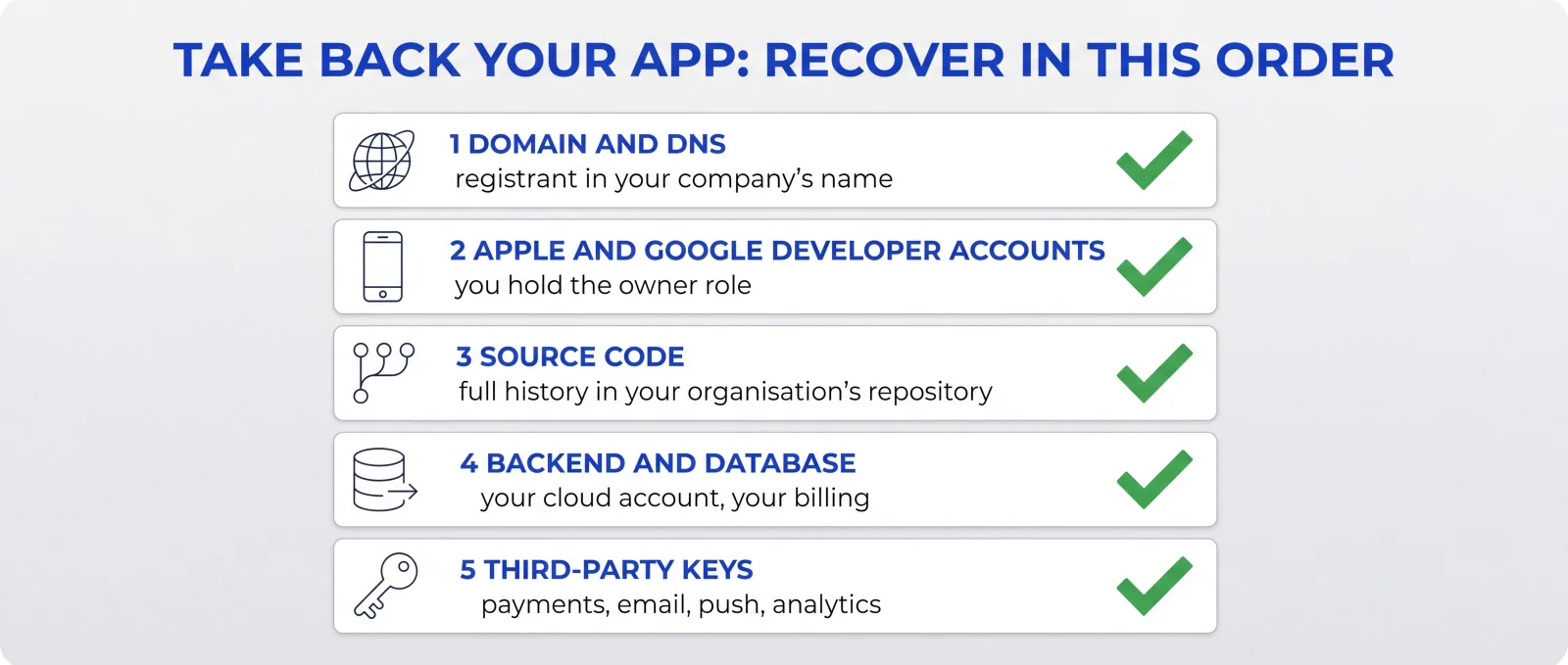
Recover them in this order:
1. Domain and DNS. Your website, your email and often the app's sign-in links depend on it, so the registrant should be your business. If you're changing registrar as well, do that first. Many registrars lock a domain for 60 days after a change of owner unless you opt out. For .uk domains, ask your registrar, because Nominet's process is different until February 2027.
2. Store accounts. Both transfers above.
3. Source code. You can't release anything without it. The repository should be in your organisation's GitHub, or equivalent, with its full history. GitHub transfers keep issues and pull requests and redirect the old links, but webhooks, secrets and deploy keys stay attached, so rotate them after the move.
4. Backend and database. Firebase, Supabase, AWS or wherever the data lives. Your business should own the project or cloud account and the billing. This is where your customers' data is. A developer in the same thread wrote: "In one case the old dev ghosted and we never got control of the production database. The client had already launched, and had to lose their first week and a half of users". If the app was built in Lovable, its database may be in Lovable Cloud, and Lovable says there's no one-click migration from there to your own Supabase project. Our post on Lovable to the App Store covers what that means.
5. Third-party keys and services. Stripe, RevenueCat, email and SMS providers, push notification keys, analytics and maps. List every API key and webhook the app uses, then move or reissue each one into your own accounts. If the app takes payments through Stripe, check what it sells. For digital content bought inside an iPhone app, Apple usually expects its own in-app purchase, as we explain in our post on Base44 and Stripe.
The process is the same when an agency built the app, but check a few things first. Read the contract: some agency terms only pass ownership of the code to you once the final invoice is paid, so settle anything outstanding before you ask. Look at which account the agency used. Some publish every client's app from their own organisation account, and that needs an app transfer. Others work inside your account with one of their staff as Account Holder or account owner, so only the role has to move to someone in your business. Ask for one named person to run the handover, too. Agency staff move on, and whoever set up your push keys or Firebase project may have left, which makes it likelier that a forgotten account sits in a former employee's name. Once it's done, remove every agency user from your store accounts, repository and cloud projects.
Neither store lets you pull an app out of someone else's account. Apple's transfer can only be started by the current Account Holder, and Google's request comes from the original account. Changing who owns a domain also needs the current registrant to confirm it. So a developer who won't help, or can't be reached, can stall the whole thing.
Start with your contract and what it says about who owns the code, the store listings and the accounts. Then ask in writing for a specific list (the app transfer, repository access with history, the upload key, the backend project and the domain) and give a date. If that doesn't work, talk to a solicitor. We're not lawyers, and an ownership dispute is a legal question. If the problem is only that the owner of your own Play Console account can't be reached, Google says to contact Play Console support.
If the app can't be recovered, the last resort is publishing it again from your own account as a new listing. It needs a new bundle ID and package name, because the old ones stay registered to the old account. Existing users have to install the new app, their data only follows if the backend is yours, and you start again with no reviews.
Our App Rescue service starts with a free check, then a £95 code review. The review covers the code, and who owns it and the accounts the app runs on. You get the findings in writing, ranked, and the £95 is credited in full against any work that follows. Once everything is in your name, App Care can look after it from there.
Yes. The current Account Holder starts it from App Information in App Store Connect, and the receiving Account Holder accepts it within 60 days. The app needs at least one released version and can't be in review.
Yes. Apple says the app stays available and keeps its reviews and ratings. The transfer can take up to two business days.
The current owner submits a transfer request with both accounts' registration transaction IDs, and the receiving account approves it. Google's support team replies within two working days. Users, ratings and subscriptions move with the app.
On Apple, if the account belongs to your organisation, the current Account Holder hands the role to a team member with authority to sign for the business, from Membership details on the Apple Developer website. Individual memberships can't be handed over this way. On Google Play, the account owner picks another existing user and selects Make account owner. There's a seven-day hold before it takes effect.
Neither store can move the app without the current account owner. Check your contract, try every contact route in writing, and get legal advice if you need to. If the app can't be recovered, it can be published again from your own account as a new listing.