Base44 can build your App Store and Google Play files, but what's inside is your web app in a wrapper, and it can't take Apple or Google in-app payments yet. We'll tell you what you own and whether you can charge for it. Start with a free check, then a £95 review credited against any work that follows.
50+ apps shipped since 2017
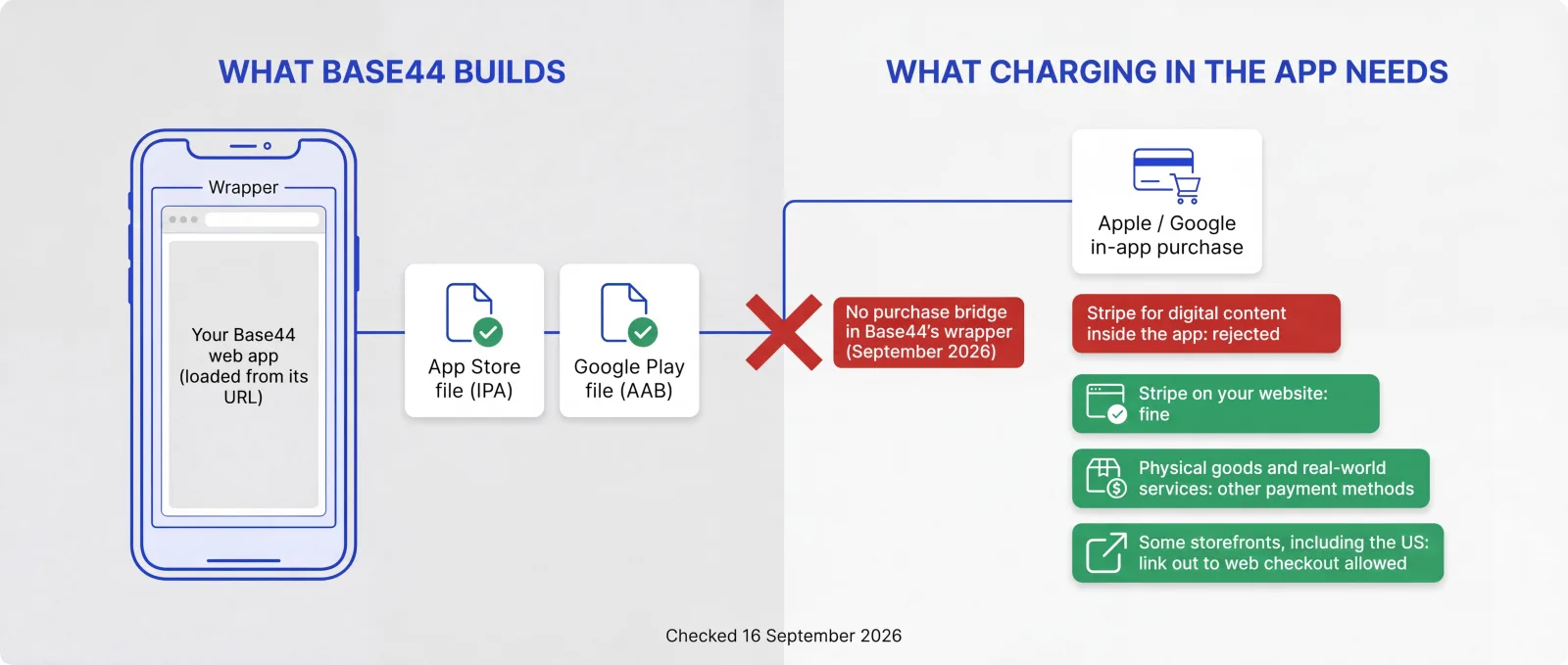
Base44 has been able to build App Store and Google Play files since February 2026, on the Builder plan or higher, and Base44 apps are live on both stores. What surprises founders is what the files contain. Base44's own documentation says your mobile app "runs your published Base44 app inside a secure web view. This is a lightweight native wrapper around your web app that opens only your app’s URL."
A wrapper is fine for a lot of apps. It stops being fine when you want to charge for something inside the app. Apple and Google require their own billing for digital content such as subscriptions and premium features. Base44's documentation is blunt about the obvious workaround: "If your app uses Stripe for digital content, your app is rejected." Base44 doesn't yet connect its wrapper to Apple's StoreKit or to Google Play Billing either. Its docs say "We are working on a built-in integration", with no date.
RevenueCat, a subscription service many founders try next, reached the same conclusion on its own community forum in June 2026: "Because Base44 apps run inside a WebView, and Base44 does not currently provide a native bridge to StoreKit or RevenueCat’s iOS SDK, there currently is not a way to directly connect a Base44 mobile app to App Store subscriptions in the same way you would with a native iOS app."
So, as of September 2026, if your business depends on selling digital content inside the iPhone or Android app, for UK customers that usually means leaving Base44's wrapper. In some storefronts, including the US, Apple allows apps to link out to a web checkout instead. Charging on your website with Stripe works too, and so does selling physical goods or real-world services, which Apple's Guideline 3.1.3(e) says must use a payment method other than in-app purchase.
Not always. Base44 apps can be added to a phone's home screen straight from the browser, and they open much like an app. If you don't need in-app payments, push notifications or a store listing that may be all you need. Looking for Base44's own app for building on your phone? That's a separate app published by Base44. This page is about getting the app you've built into the stores.
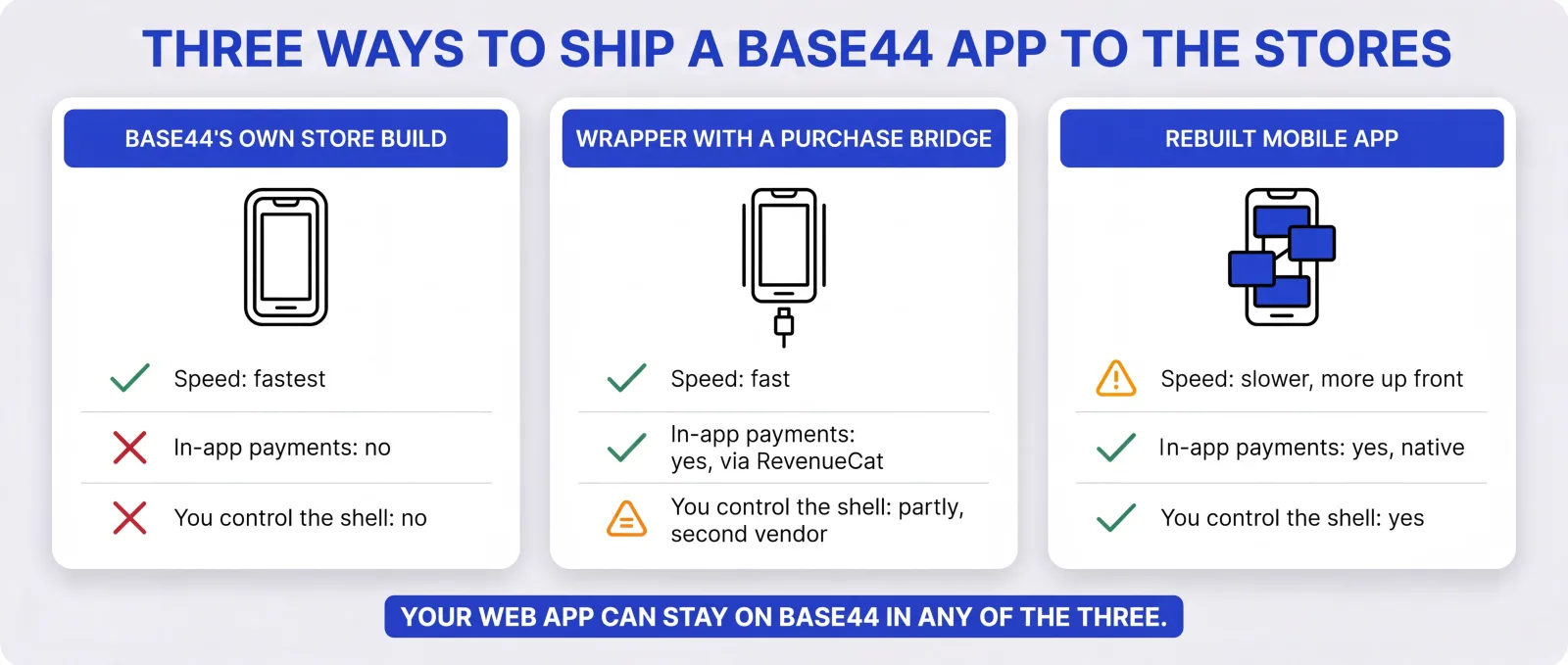
People who charge in-app today take one of two routes, and we deliver either. Which one is your call, and the £95 review sets out the trade-offs for your app.
The first is a third-party wrapper with a purchase bridge, such as Median, Natively or Despia, wired to RevenueCat. Your app keeps running on Base44, and the new wrapper replaces Base44's store build so purchases go through StoreKit and Google Play Billing. It's quicker and cheaper to get live. You add a second vendor to the chain, and the app is still a website inside a shell. Getting purchases, restores and web subscribers to agree is where founders report losing weeks.
The second is a rebuilt mobile app in React Native or Flutter with native purchases, while your web app stays on Base44 or moves to a stack you own. It takes longer and costs more up front. In return you control the whole app, with no wrapper between your customers and the payment sheet, and offline use and HealthKit become possible.
Getting your existing app to production, including a wrapper route with in-app payments and store submission, is a fixed £999 to £1,999 depending on complexity. A full React Native or Flutter rebuild isn't in that band: we quote it at a fixed price after the review.
Some store problems can't be fixed from inside Base44, however many credits you spend, because Base44 generates the wrapper and you can't edit it. Base44's documentation says the permissions your app requests "are not editable in the Base44 interface", and Base44 sets your Android package name as com.base plus your app ID.
Founders have reported iOS builds rejected for permission text they never added, Android bundles rejected because the package name no longer matched their first upload, sign-in that didn't work on iPad, and support tickets answered with no date for a fix. Base44 shipped a July 2026 update titled "Fewer App Store rejections for iOS builds", though founders reported permission-text rejections again in August, and a fault in the shell still has to wait for Base44's fix.
Your code can come out in a few ways. The export button in the Base44 editor sends your app's code to GitHub or downloads it as a ZIP, including client-side code and backend functions. Two-way GitHub sync, on the Builder plan or higher, keeps your repository up to date. Base44's command-line tool also has a base44 eject command that copies your frontend code and backend resources, such as entity schemas, into a new local project with an empty database.
Your data can come out too, one table at a time, as a CSV file from the Data page. Leaving Base44 completely still takes planned work: rebuilding sign-in, moving uploaded files and pointing everything at a backend you own.
None of that changes the mobile app: the one in the App Store stays your website in a wrapper, still without in-app purchases.
It can, and payments are a bigger risk than the "just a website" rejection founders tend to worry about. The rejections founders report most often involve payments (Guideline 3.1.1), design and iPad layout, sign-in, and app names. Base44 itself says it "cannot guarantee that an app is approved, even with a high readiness score." We have a 90% first-submission approval rate across the App Store and Google Play.
Apple can also reject a wrapped app as too thin. Guideline 4.2 says "Your app should include features, content, and UI that elevate it beyond a repackaged website." It happens, but rarely. One Base44 founder reported four rejections under Guideline 4.3 (spam) before approval.
Test on real devices before you submit, through TestFlight on iPhone and a testing track in Google Play Console. Google Play has an extra step for some founders: if you publish from a personal developer account created after 13 November 2023, Google requires a closed test with at least 12 testers opted in for 14 days in a row before you can go to production. Google Play has its own minimum functionality rule too, so a thin app can be turned down there as well, though Google's rule about wrapping someone else's website doesn't apply when the site is yours.
Apple's Guideline 4.2.6 is aimed at app generation services: "Apps created from a commercialized template or app generation service will be rejected unless they are submitted directly by the provider of the app’s content. These services should not submit apps on behalf of their clients". Base44 follows it. It prepares the files, and you submit from your own developer accounts.
When someone else does the submitting for you, the rule that matters is Guideline 5.2.1: "Apps should be submitted by the person or legal entity that owns or has licensed the intellectual property and other relevant rights." We always submit from your own Apple and Google accounts, and you keep the owner role. On Apple's side that's the Account Holder, the only role that can accept Apple's agreements. The listing is yours from the first day.
Often you can, and founders have moved off Base44 that way. It tends to stall on purchases that have to agree across both stores and your website, which our no-code to production page covers in more detail.
Tell us about your app through a short form, and one of our engineers replies with written triage: where you stand and what we'd look at first. It's free, and it doesn't commit you to anything.
If you want to go further, the £95 review covers what an automated scan can't reach, starting with whether you can charge for your app in the stores and what you actually own. The £95 is credited in full against any paid work you go ahead with. Get a free check.
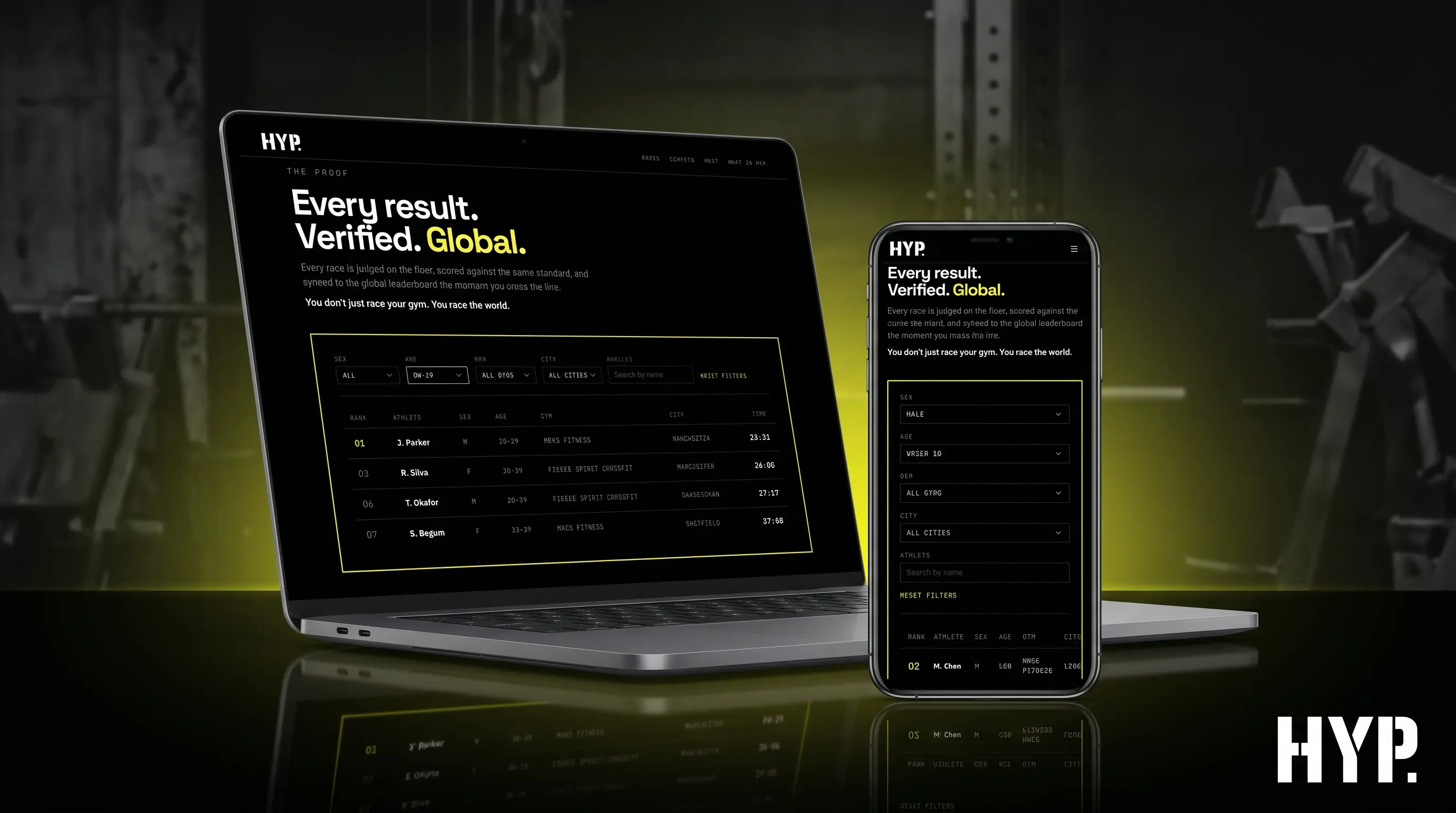
Base44 is one of several platforms our no-code to production service covers. HYP. started as a Base44 prototype, and we rebuilt it as a Next.js web platform its founder owns and runs (a web rebuild, with no app store or payments work).
An app that passed review last month can break next month without anyone touching it. Apple and Google ship new iOS and Android versions every year, Google Play sets target API deadlines, SDKs you depend on change, and store policies move. Apple also removes apps nobody looks after: under its App Store Improvements policy, an app with no update in three years and very few downloads over the past 12 months gets an email and 90 days to submit an update, and an app that crashes on launch is removed straight away. Crowded categories such as dating, flashlight, sound effects, wallpaper, simple timers and fortune telling face a stricter rule. Guideline 4.3(b), which Apple clarified in June 2026, says "We may remove these apps from the App Store going forward if they are not updated, improved, or do not attract customers."
So when we deliver your app, the first month of App Care is included and the onboarding fee is waived, because we built the app. App Care starts with a three-month initial term: months two and three are billed at your plan's rate (from £675 a month), and it's rolling monthly after that.
Base44 changes fast, so this section is dated. Checked against Base44's documentation, pricing page and changelog on 16 September 2026. Next review: 16 October 2026.
Store files: App Store and Google Play files are available to download on the Builder plan or higher. You can run Base44's app scan on the free plan.
What's in the files: a native wrapper that loads your published web app. Most content and design changes reach the installed app without a new store version.
In-app purchases: no StoreKit or Google Play Billing integration yet. Base44 says it is working on one. Stripe for digital content inside the mobile app gets rejected, according to Base44's own docs.
Push notifications: supported, set up when you generate the store files.
Not supported yet: full offline mode and HealthKit.
Permissions: set by Base44, not editable. Base44 has generated iOS permission text automatically since 26 July 2026.
Code and data export: code to GitHub or as a ZIP from the editor; two-way GitHub sync on the Builder plan or higher; base44 eject copies code and backend resources with an empty database; tables download as CSV files.
Without the stores: Base44 apps can be added to a phone's home screen from the browser.
Store account costs: Apple's Developer Program is listed at 99 USD a year; Google Play registration is a one-off US$25.
Written by Gareth Reese, Founder and CTO of Foresight Mobile. Gareth has been involved in mobile app development for over 25 years and has led delivery at Foresight since 2017, including maintenance of flutter_markdown_plus, downloaded about 570,000 times a month on pub.dev.
An actionable four-week plan with clear deliverables and an unbeatable £3,500 price point, credited against your first development sprint.
Total client time commitment: 5-7 hours across 4 weeks
We meet with your key stakeholders to understand your business goals, user needs, and technical constraints. You'll share any existing research, designs, or documentation you have.
Our engineering team assesses the technical feasibility, identifies integration points with your existing systems, and evaluates architecture options.
We determine whether Flutter, native development, or another approach makes the most sense for your specific requirements.
We create clickable prototypes so you can experience your app before it's built. You'll test navigation flows, validate the user experience, and gather feedback from stakeholders.
Alongside this, we prioritise features based on business value and technical complexity, mapping out a phased delivery plan with a detailed cost estimate.
You receive your complete Gameplan pack, plus a presentation walkthrough with Q&A. Your team walks away with everything needed to make a confident decision.
For non-technical founders whose Base44 app works and now has to take payments and get through store review.

New iOS and Android versions, Google Play target API deadlines and store policy changes all land after launch. The first month of App Care is included when we deliver your app and the onboarding fee is waived, so a team is watching it from launch day.
Security scanners find configuration problems. Whether you can charge for your app in the stores, and whether the business behind it holds up, needs a person to look. Start with a free check, then a £95 review, credited in full against any paid work that follows.
Your app goes out under your own Apple and Google developer accounts, as Apple's Guideline 5.2.1 expects, and you keep the owner role. We prepare the listing and handle reviewer questions, but the store listing is yours from day one.
Base44 lets you export your code to GitHub or a ZIP and download your tables as CSV files, but sign-in and uploaded files take more work to move, and the mobile app stays a wrapper either way. We map what you can take with you, then move it into your own GitHub and hosting accounts.
When the fault sits in a wrapper you can't edit, such as permission text you never added or a package name that changed, more prompting won't fix it. We move the app to a build that doesn't depend on Base44's support queue for the next fix.
Base44's wrapper can't take Apple or Google in-app payments yet, and Stripe for digital content gets rejected. We set up purchases that work on both stores, through a wrapper with a purchase bridge or a rebuilt mobile app, whichever you choose, and make sure someone who pays on the web isn't charged again on their phone.
It depends what your app does, and Base44 doesn't publish a user-count ceiling. Founders running apps with a lot of backend requests have reported hitting Base44's rate limits, and at least one who moved off for that reason later came back and said things had improved. From what we've seen, simple apps are usually fine. If your app leans on the backend, load-test it before a launch or a big marketing push, and ask for a free check if the numbers worry you.
You need Base44's Builder plan or higher to download the store files (check Base44's pricing page, because plans change). Apple's Developer Program is listed at 99 USD a year, charged in local currency where available, and Google Play registration is a one-off US$25. If you plan to charge inside the app, add the cost of a purchase bridge or a rebuilt mobile app, since Base44's wrapper can't take in-app payments yet. Our wrapper route is a fixed £999 to £1,999, and a rebuild is quoted at a fixed price after the review.
Yes, and it should still go from your own developer accounts. Base44 prepares the files but "does not create or manage your developer accounts", so you, or whoever helps you, submit through your App Store Connect and Google Play Console. Apple's Guideline 5.2.1 says apps should be submitted by whoever owns the rights to them. When we do it for you, we work inside your accounts, you keep the owner role, and the listing stays yours. The no-code to production page explains which access to give a developer.
One founder reported Google and Apple sign-in not working on iPad inside Base44's wrapper, and was approved only after removing it. Google login also needs your Google Play App Signing fingerprint added in Base44. If sign-in still fails, the fault may be in a wrapper you can't edit, and a native sign-in flow in a rebuilt app is the lasting fix.
Mostly, yes. Base44's documentation says most content and design changes you publish appear in the installed app without a new store version, because the app loads your live site. Changes to the shell itself, such as push notifications, the app name or permissions, need new files and a new review. Test changes carefully, because a live update reaches store users immediately, with no review in between.
Create your Google Play files in Base44 (Builder plan or higher) and upload the bundle in Google Play Console, which costs a one-off US$25 to register. Base44 sets the package name, and later uploads have to match it. Try the app through a testing track first. If your developer account is a personal one created after 13 November 2023, Google also requires a closed test with at least 12 testers opted in for 14 days before you can publish to production.
Start with the guideline number in the rejection. Payments (3.1.1), design or iPad layout (4) and sign-in come up most. Some faults sit in Base44's wrapper rather than your app, such as permissions you can't edit, and those need a fix from Base44 or a move to a build you control. Less often, Apple rejects an app as too close to a website (4.2) or as spam (4.3). One founder rejected as spam four times got approved after reworking the app around a distinct feature. Send us the letter with a free check.
Yes. The export button in the editor sends your code to GitHub or downloads it as a ZIP, including backend functions, and two-way GitHub sync (Builder plan or higher) keeps your repository current. The base44 eject command copies your frontend code and backend resources, such as entity schemas, into a new project with an empty database. Your data downloads one table at a time as CSV. Moving sign-in and uploaded files takes more work, and exporting doesn't change your mobile app, which stays a wrapper.
Not for digital content sold to UK customers inside the app. Apple and Google require their own billing for subscriptions and premium features, and Base44's documentation says that if your app uses Stripe for digital content, it gets rejected. In some storefronts, including the US, Apple allows apps to link out to a web checkout. Stripe is fine on your website, and inside the app for physical goods or services used outside it, which Apple's Guideline 3.1.3(e) says must use a payment method other than in-app purchase.
You can't inside Base44's own store build, as of September 2026. Base44 has no bridge to Apple's StoreKit or Google Play Billing yet, and RevenueCat has said there's currently no way to connect a Base44 mobile app to App Store subscriptions directly. Founders who charge in-app today either switch to a third-party wrapper with a purchase bridge, such as Median, Natively or Despia, usually wired to RevenueCat, or rebuild the mobile app. We deliver both, and the £95 review sets out the trade-offs for your app.
Not in the sense most people mean. Base44 builds real App Store and Google Play files, but its own documentation describes the app as "a lightweight native wrapper around your web app that opens only your app’s URL." For many apps that's enough, and some don't need the stores at all, because a Base44 app can be added to a phone's home screen from the browser. It becomes a problem when you need in-app purchases, offline use or HealthKit, which Base44 doesn't support yet. A rebuild in React Native or Flutter can handle all three.
On the Builder plan or higher, open Publish, choose the mobile app option, run Base44's app scan, then create your App Store files. You upload those and submit from your own Apple developer account, since Base44 doesn't submit for you. Test on a real iPhone through TestFlight first. Bear in mind that the app Base44 builds is your web app inside a wrapper, and it can't take Apple in-app payments yet, so if you plan to charge for anything in the app, sort that out first. A free check will tell you whether it affects you.
The free check is a written reply from a person, based on a short form about your app: what we'd look at first, and whether we think you need us. The £95 review is an engineer's look at what automated scans can't judge. Can you charge for your app on the web and in the stores? Are your business rules enforced in code? Can search engines and AI assistants find your pages? What do you own, and what are you tied to? You get the findings in writing, with a fixed quote if there's work to do, and the £95 is credited in full against any paid work we do next.
Usually not. Apple's App Manager role can submit apps for review, and can upload builds once you give it access to certificates, identifiers and profiles, which covers what a developer needs to publish your app. Admins can add and remove users, and only the Account Holder can accept Apple's legal agreements, so keep both roles for yourself. If someone asks for Admin just to submit a build, ask them why. Google Play Console lets you grant permissions app by app, and the same principle applies.
Often, yes. If you can read what the tool changes, your app doesn't take payments or hold sensitive personal data, and you have the time, an AI coding tool is a cheap way to move off a builder, and plenty of founders have done it. It gets harder when you can't judge the output. The tool may tell you a security rule is in place when it isn't, and getting web payments and store subscriptions to agree on one customer can take weeks of prompting. A £95 review still helps if you do the work yourself, because you'll know what to ask the tool for and what to check.
It starts with a free check, so you know where your Base44 app stands before you spend anything. The £95 review then looks at what a scanner can't reach, and ends in a fixed quote for the route you choose. We deliver it, submit from your accounts, and look after the app for its first month in the stores.

Read by one of our engineers
Fill in a short form about your Base44 app: what it does, who uses it, whether you want it in the App Store or Google Play, and how you plan to charge. One of our engineers replies in writing with a first view of where you stand and what we'd look at next. There's no fee and no commitment, and if Base44's own store build, or a home-screen web app, is all you need, we'll say so.

Can you charge for it, and what do you own?
We look at your app itself. Can you charge for it in the stores, given that Base44's wrapper has no in-app purchase bridge? Is the business logic sound, or could one customer see another's data? Can search engines and AI assistants see it? What can you export, from code on GitHub to tables as CSV, and what takes more work to move? You get a written answer and a fixed quote. The £95 is credited in full against any paid work that follows.

The route you choose
That's either a wrapper with a purchase bridge wired to RevenueCat, or a mobile app rebuilt in React Native or Flutter with purchases that work on both stores. The wrapper route is a fixed £999 to £1,999 depending on complexity; a rebuild gets its own fixed quote after the review. Where your web app needs to leave Base44 too, we move the code into your GitHub and the data, users and sign-in onto a stack you own, testing each step before the next.

Launched from your accounts, then looked after
We prepare the store listing, privacy details and review notes, then submit from your own Apple and Google developer accounts, and you keep the owner role. If a reviewer pushes back, we handle the reply. The first month of App Care's three-month initial term is included and the onboarding fee is waived. Months two and three are billed at your plan's rate.
Your app, your way. Here's how we make it happen
We've delivered 50+ apps since 2017, so we know what App Store and Google Play reviewers look for before your Base44 app reaches one.
The first check is free. The review is a fixed £95, credited in full against any paid work that follows. Getting your app to production is a fixed £999 to £1,999, and a rebuild is quoted at a fixed price, so you know the cost before work begins.
Our 90% first-submission approval rate covers both the App Store and Google Play.
Foresight maintains flutter_markdown_plus on pub.dev, downloaded about 570,000 times a month.
Code goes into your GitHub from the first commit, IP is assigned to you on payment of each milestone, and the app is published from your developer accounts, never ours.
The first month of App Care is included and the onboarding fee waived. Plans start at £675 a month, and the most critical issues get a 2-hour response during UK office hours.