Built your app with Lovable, Base44, Replit, Bolt.new or another AI builder, and now real users are arriving? Start with a free check from a person and a £95 review credited in full. Delivery is a fixed £999 to £1,999, in accounts you own.
50+ apps shipped since 2017
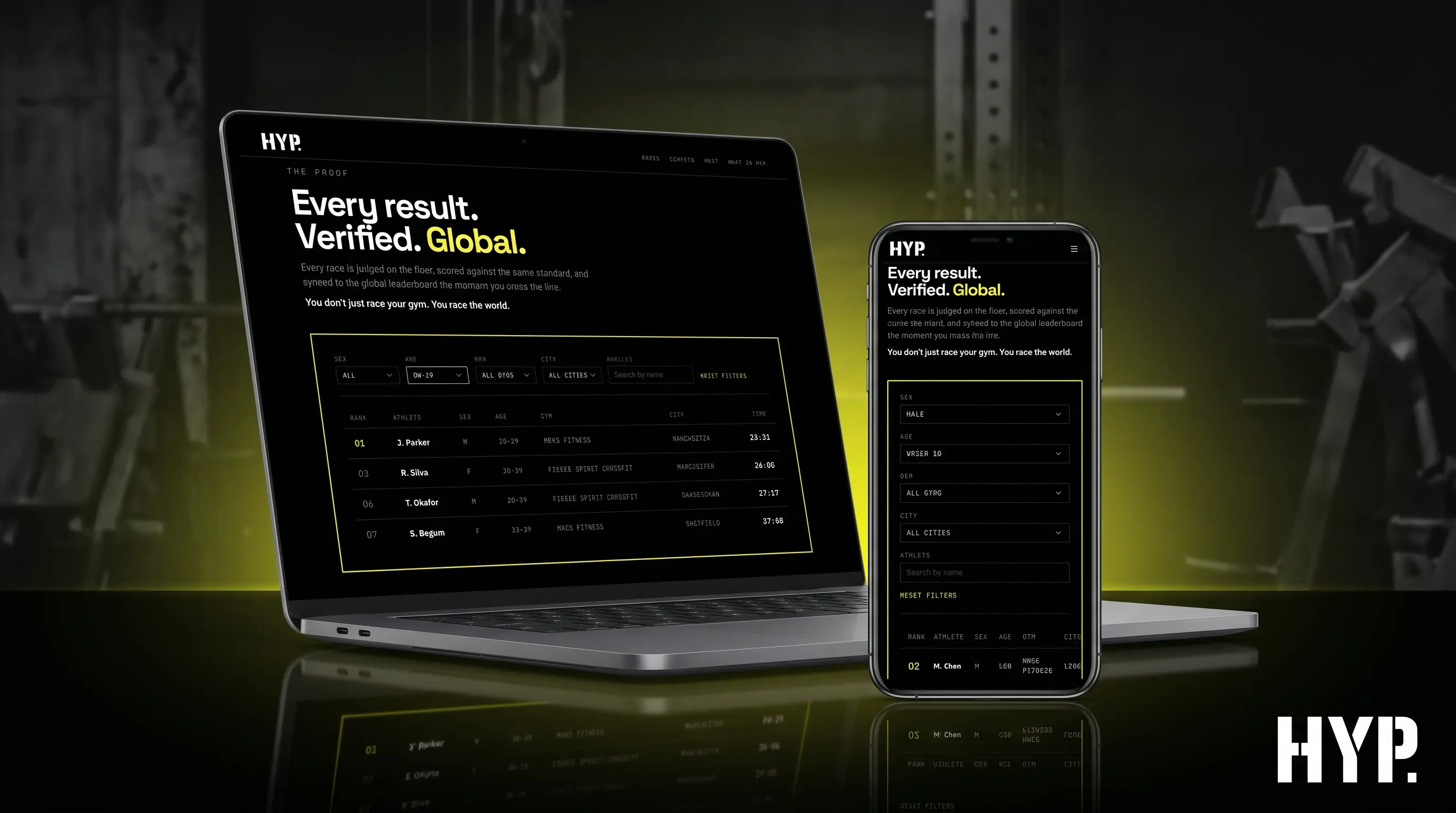
You made something people want in Lovable, Base44, Replit, Bolt.new, FlutterFlow, Bubble or Cursor, without a development team. In our experience most of that work is worth keeping. We've moved a Lovable app's backend off Lovable Cloud onto the founder's own infrastructure, and rebuilt a Base44 prototype for HYP. as a production Next.js web platform the founder runs himself. The trouble tends to start when real users arrive: a fix in one place breaks something three screens away, the credits keep going, a payment never reaches your account, or someone emails to say they can see data they shouldn't.
This page is for that moment, whichever builder you used. If you built on Lovable or Base44, there's a page for each: Lovable to production and Base44 to production.
1. A free check. Tell us about your app through a short form. A person reads it and replies in writing with what we'd look at first and whether we think you need us at all.
2. A £95 review. An engineer looks at what an automated scan can't judge. Can you charge for your app on the web and in the app stores? Are your business rules enforced in code? Can Google and AI assistants find your pages? And what do you own? The £95 is credited in full against any paid work we do for you next.
3. Fixed-scope delivery. Getting your existing app to production is a fixed £999 to £1,999, depending on complexity. That covers fixes, security, moving your backend, in-app payments, store submission, or a wrapper route to the stores. A full native or cross-platform rebuild isn't in that band: if you need one, we give you a fixed-price quote after the review. The work happens in your own code repository and accounts, and the first month of App Care's three-month initial term is included, with the onboarding fee waived, because we built the app.
Get a free check and we'll reply in writing.

Founders describe the same loop again and again. The builder got you most of the way quickly. Now each prompt fixes one thing and breaks another, and the agent says everything's fine. Once an app gets big enough, the tool can't keep all of it in view, and in our view more prompting rarely gets you out.
Then there's the bill. You pay in credits, and the costs that hurt often arrive after launch, as database usage climbs with real users or an agent keeps running. Founders have posted about usage bills that ran on without a warning email, and about spending limits they thought were set but weren't. Once customers are paying you, the app belongs on infrastructure where you can see and cap each cost.
This is where most store trouble sits. On the web you can take payment with Stripe. In UK App Store apps, Apple's Guideline 3.1.1 requires in-app purchase for subscriptions, premium content and paid features. Some storefronts, including the US, let apps link out to a web checkout, and selling real-world services such as bookings doesn't need in-app purchase at all. Google Play has its own billing policy. So an app sold on the web and in the stores usually ends up with two payment systems that both have to update the same customer record. Get that wrong and people either pay twice or get in free.
Some builders make this harder. Base44 will produce App Store and Google Play files for you, but as of September 2026 there's no way to connect Apple or Google in-app purchases inside Base44's own wrapper. There are two ways through, and we build either. One is a third-party wrapper such as Median, Natively or Despia with RevenueCat handling subscriptions, which keeps you building in Base44. The other is a native rebuild, which gives you full control of the app at a higher upfront cost. In the first-hand accounts we read from founders who submitted AI-built apps this year, rejections came far more often from subscriptions, sign-in, iPad layouts and trademarked names than from the app being "just a website".
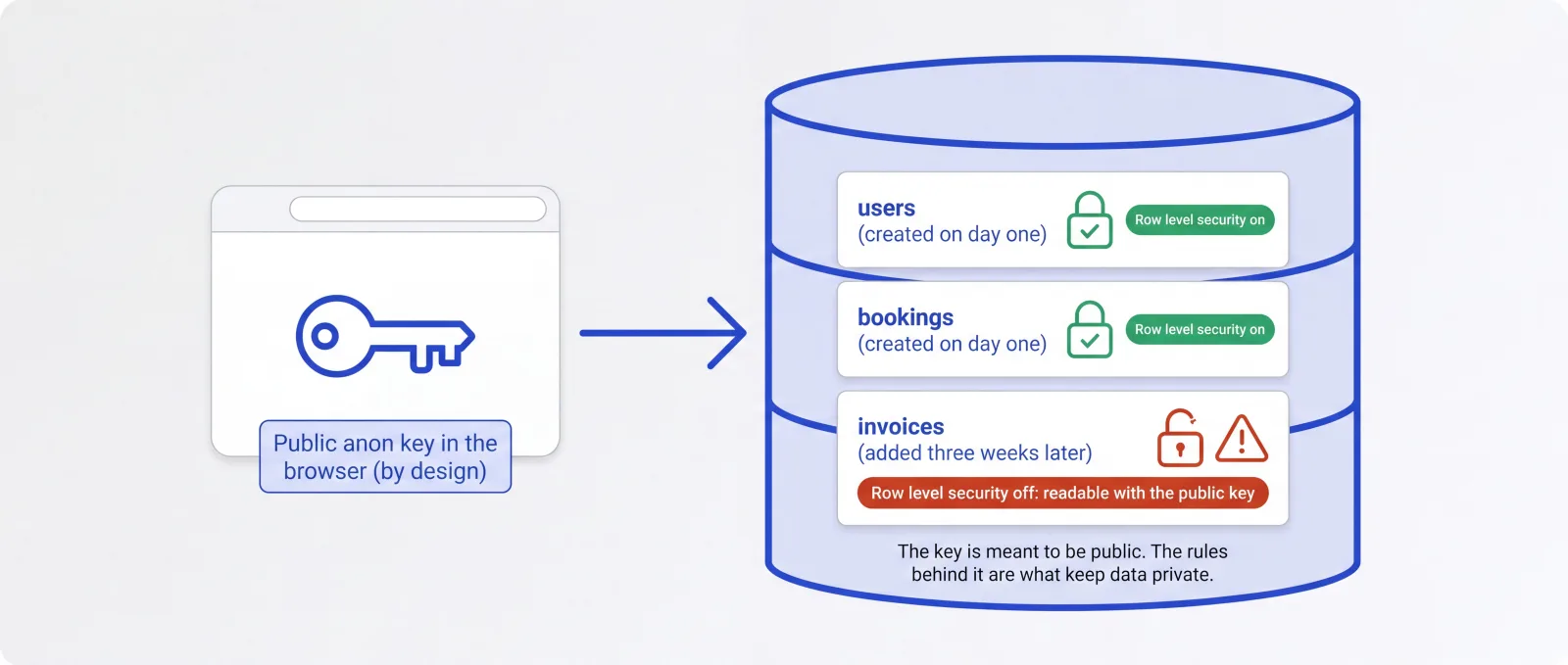
Most AI builders set up sensible access rules on day one. The gaps come later. On apps backed by Supabase (most Lovable apps, and many built with Bolt.new or Cursor), the key in the browser is meant to be public. It's only safe while row level security is switched on and correctly written for every table. It usually is for the tables the builder created at the start. It often isn't for the table you added three weeks in.
The other gap is business rules. If the only thing stopping someone booking without a verified email is an instruction in the AI's prompt, that's a request to the AI, and it won't always be followed. We check that the rules that matter run in code on the server: who can see what, who has paid, and what happens when a payment webhook arrives.
Start with the basics: is the app public at all, is it on your own domain with a correct canonical address, and is it in Google Search Console? After that comes rendering. Many AI-built web apps are assembled in the browser, so the raw HTML is almost empty until JavaScript runs. Google can render that, though often later, but in Vercel's December 2024 analysis none of the major AI crawlers rendered JavaScript. Some hosts cover this for you. Lovable pre-renders apps it hosts for the main search and AI crawlers, so viewing the source can give a false alarm there, but moving the app off Lovable's hosting loses that. Anywhere without pre-rendering, the fix is to send real HTML for the pages you want found.
Apple and Google judge these apps differently, so it helps to take them one at a time.
Apple. We submit from your own Apple Developer account, and you keep the Account Holder role. Guideline 5.2.1 says apps "should be submitted by the person or legal entity that owns or has licensed the intellectual property", and the app is yours. We work inside the account with an App Manager role, which can submit for review and, once you've given it access to certificates, identifiers and profiles, upload builds, all without Admin rights. Our first-submission approval rate is 90%. Guideline 4.2 says an app "should include features, content, and UI that elevate it beyond a repackaged website." Wrapped web apps do get approved, including ones built on Lovable and Base44. Apple can still reject one as too thin, and we've read of it happening to an app that already had Face ID and push notifications, so bolting on a native feature isn't a guaranteed fix. If an app builder offers to publish for you, note Guideline 4.2.6: apps from an app generation service "will be rejected unless they are submitted directly by the provider of the app's content."
Google Play. Play's webview rule is aimed at apps that wrap sites the developer doesn't own, so it doesn't apply to your own web app. Its minimum functionality policy still does, so a wrapped app has to be useful in its own right. Registering a developer account is a one-off US$25 fee. The bigger hurdle is testing: personal developer accounts created after 13 November 2023 need at least 12 testers opted in for 14 days in a row before the app can reach production. As on Apple, we publish from your account and you keep the owner role.
Wrap it or rebuild it? A wrapper built with a tool such as Capacitor is fine for plenty of apps, and we'll tell you if yours is one of them. We recommend a rebuild in React Native with Expo, or in Flutter, when the wrapper keeps getting in the way: payments that have to work across the web and both stores, offline use, background tasks, or device features it can't reach cleanly.
These platforms change monthly, so read this as a snapshot. We'll review it by 16 December 2026.
Lovable. Your code syncs to GitHub on every plan, but there's no built-in App Store or Google Play publishing. Apps hosted on Lovable are pre-rendered for the main search and AI crawlers, and older projects can move to server rendering with an opt-in upgrade. Lovable Cloud gained a data export in July 2026. Moving to your own Supabase project is still manual: storage files download separately, and secrets have to be set up again.
Base44. Builds App Store and Google Play files that wrap your web app. The base44 eject command copies your code and backend resources such as database structure, but not your records, and tables export to CSV one at a time. There's no in-app purchase connection inside Base44's wrapper yet.
Replit. Builds real React Native apps with Expo and guides you through TestFlight to the App Store. Its documentation says Google Play publishing isn't supported yet.
Bolt.new. Uses Expo for mobile apps. To publish, you download the project and run Expo's build and submit commands yourself, outside Bolt.
FlutterFlow. Exports a genuine Flutter project on its paid plans, with FlutterFlow's helper code copied in. Once you edit the export, there's no way back into the FlutterFlow editor.
Bubble. Generates no code to export, and builds and uploads its mobile apps itself, after a first manual upload to Google Play. If you've outgrown it, the front end is rebuilt and your data sits behind an API.
Cursor or Claude Code. You already have ordinary code in your own repository, which is usually the simplest place to start from. If a developer or agency wrote your app, App Rescue is the better fit.
A live app needs looking after. Apple and Google ship new versions of iOS and Android every year, Google Play sets yearly target API deadlines, SDKs stop being supported, and store policies change. Apple removes apps nobody looks after: under its App Store Improvements policy, an app with no update in three years and very few downloads over the past 12 months gets an email and 90 days to submit an update, and an app that crashes on launch is removed straight away. Apps in crowded categories, such as dating, flashlight, sound effects, wallpaper, simple timer and fortune telling apps, face a stricter rule. Guideline 4.3(b), which Apple clarified with examples in June 2026, says Apple "may remove these apps from the App Store going forward if they are not updated, improved, or do not attract customers."
That's why, after a delivery, the first month of App Care is included and the onboarding fee is waived. App Care starts with a three-month initial term, so months two and three are billed at your plan's rate, from £675 a month, and it's rolling monthly after that. You get a shared Slack channel, a named contact, and the team that built the app watching it through launch.
Often you can, and we'd rather say so: if you can read what the tool changes and your app doesn't take payments or hold sensitive personal data, it's a cheap way to move off a builder. The FAQ below covers where it gets harder, and why a £95 review still helps if you do the work yourself.
You own all of it. The code lives in your GitHub or GitLab from the first commit. Your Apple Developer, Google Play, hosting and database accounts are in your name, you keep the owner role on each, and the intellectual property in our work is assigned to you on payment of each milestone. If you later want another developer, or want to go back to editing the app with an AI tool yourself, nothing stands in the way.
Send us a few lines about your app through the contact form and a person will reply in writing. If a £95 review makes sense, we'll say so, and it's credited in full against any paid work that follows. If you don't need us, we'll tell you that too.
Written by Gareth Reese, Founder and CTO of Foresight Mobile. Gareth has been involved in mobile app development for over 25 years and has led delivery at Foresight since 2017, including maintenance of flutter_markdown_plus, downloaded about 133,000 times a week (pub.dev, September 2026).
An actionable four-week plan with clear deliverables and an unbeatable £3,500 price point, credited against your first development sprint.
Total client time commitment: 5-7 hours across 4 weeks
We meet with your key stakeholders to understand your business goals, user needs, and technical constraints. You'll share any existing research, designs, or documentation you have.
Our engineering team assesses the technical feasibility, identifies integration points with your existing systems, and evaluates architecture options.
We determine whether Flutter, native development, or another approach makes the most sense for your specific requirements.
We create clickable prototypes so you can experience your app before it's built. You'll test navigation flows, validate the user experience, and gather feedback from stakeholders.
Alongside this, we prioritise features based on business value and technical complexity, mapping out a phased delivery plan with a detailed cost estimate.
You receive your complete Gameplan pack, plus a presentation walkthrough with Q&A. Your team walks away with everything needed to make a confident decision.
Whichever builder you used, these are the questions we answer first
Base44 will build App Store and Google Play files for you, but they wrap your web app, and as of September 2026 there's no way to connect Apple or Google in-app purchases inside that wrapper. We build either route out: a third-party wrapper with RevenueCat, or a native rebuild. You choose, and our Base44 page sets out the trade-offs.
We've moved a Lovable app's backend off Lovable Cloud onto the founder's own infrastructure, so we know where the work is. Your code syncs to GitHub on every plan. Lovable Cloud has had a data export since July 2026, but there's still no one-click move to your own Supabase, and leaving Lovable's hosting means losing the pre-rendering it gives search and AI crawlers unless you replace it. Our Lovable page covers both.

The access rules an AI builder sets up on day one are usually sensible. The gaps come from what's added afterwards: a new table with row level security switched off, or a business rule that only exists as an instruction in the AI's prompt. We check that who can see what, and who has paid, is enforced by code on the server.

Every year brings new iOS and Android versions, Google Play target API deadlines and store policy changes, and apps nobody looks after get caught out. After a delivery, the first month of App Care's three-month initial term is included and the onboarding fee is waived. Months two and three are billed at your plan's rate, from £675 a month.
Many AI-built web apps send an almost empty page and fill it in with JavaScript. Google can render that, often later, but in Vercel's December 2024 analysis none of the major AI crawlers rendered JavaScript. Some hosts, Lovable among them, pre-render for crawlers, and moving off them loses it. We check the basics first (public, own domain, Search Console), then make sure the pages you want found arrive as real HTML.
In UK App Store apps, Apple's Guideline 3.1.1 requires in-app purchase for subscriptions and paid features, so an app sold on the web and in the stores usually needs two payment systems that agree on one customer. We set those up and submit from your own accounts, with a 90% first-submission approval rate.

Your screens, your product decisions and your users' data usually carry forward. What tends to need replacing is underneath: the backend, sign-in, payments or hosting. We'll tell you plainly when a wrapper is enough for the App Store and when a rebuild in React Native or Flutter is the better call for your app.
Tell us about your app and a person replies in writing with what we'd look at first. If it's worth going further, a £95 review covers what a scanner can't judge: whether you can charge for the app, whether your business rules hold, whether search engines and AI assistants can find it, and what you own. The £95 is credited in full against any paid work that follows.

Each builder leaves you somewhere different. Replit builds real Expo apps but doesn't yet support Google Play publishing. On Bolt.new, you run Expo's build and submit commands yourself. FlutterFlow exports genuine Flutter code with no way back into its editor, and Bubble exports no code at all. We start from wherever your builder left you.
It depends on who wrote the code. If you built the app yourself, in any tool including Cursor or Claude Code, start with no-code to production. If a developer or agency wrote it, with or without AI tools, App Rescue is the right service. Both start with a free check, so if you're not sure, tell us how the app was made and we'll point you to the right one.
It can be, once you've answered a few questions. Who fixes it if it breaks first thing on a Monday? Can each person see only what they should? Is the data backed up, and stored somewhere your company is allowed to keep it? What happens when two people edit the same record? If you can't answer those yet, the free check will tell you what to sort out before rollout, and App Care answers the first question afterwards.
Before paying for more of the same, get someone to write down what's wrong. A £95 review gives you that in writing, whoever does the work next. Before anyone else touches the app, make sure the code is in a repository you own and every account is in your name.
Check the basics first: is the app public, is it on your own domain with the right canonical address, and is it in Google Search Console? If all that's fine, rendering is the usual cause. Many AI-built web apps send an almost empty HTML page and fill it in with JavaScript. Google can render that, though often later, but in Vercel's December 2024 analysis none of the major AI crawlers rendered JavaScript. Some hosts pre-render pages for crawlers: Lovable does this for apps it hosts, which also means moving off Lovable's hosting loses it. Anywhere else, the fix is to send real HTML through server rendering or pre-rendering.
Yes, with an extra step. Registering costs a one-off US$25. Google Play then requires personal developer accounts created after 13 November 2023 to run a closed test with at least 12 testers who stay opted in for 14 days in a row before the app can go to production. Plan for that fortnight in your launch date.
Most AI builders charge in credits, and costs grow in two places. While you build, credits go every time a prompt fixes one thing and breaks another. After launch, database and hosting usage grows with real users. Founders have also posted about usage bills that ran on without a warning email, and about spending limits they thought were set but weren't. Once customers are paying you, it's worth running the app on infrastructure where you can see and cap each cost.
The free check is a written reply from a person, based on a short form about your app: what we'd look at first, and whether we think you need us. The £95 review is an engineer's look at what automated scans can't judge. Can you charge for your app on the web and in the stores? Are your business rules enforced in code? Can search engines and AI assistants find your pages? What do you own, and what are you tied to? You get the findings in writing, with a fixed quote if there's work to do, and the £95 is credited in full against any paid work we do next.
Usually not. Apple's App Manager role can submit apps for review, and can upload builds once you give it access to certificates, identifiers and profiles, which covers what a developer needs to publish your app. Admins can add and remove users, and only the Account Holder can accept Apple's legal agreements, so keep both roles for yourself. If someone asks for Admin just to submit a build, ask them why. Google Play Console lets you grant permissions app by app, and the same principle applies.
Often, yes. If you can read what the tool changes, your app doesn't take payments or hold sensitive personal data, and you have the time, an AI coding tool is a cheap way to move off a builder, and plenty of founders have done it. It gets harder when you can't judge the output. The tool may tell you a security rule is in place when it isn't, and getting web payments and store subscriptions to agree on one customer can take weeks of prompting. A £95 review still helps if you do the work yourself, because you'll know what to ask the tool for and what to check.
Yes. These questionnaires ask about encryption, access control, backups, incident response and where data is stored, and an app built quickly on an AI builder often can't answer them yet. We fix the architecture first. Then we help with the evidence buyers usually ask for next: a penetration test from a CREST-accredited firm, Cyber Essentials (often required for UK public-sector supply chains), a data processing agreement, and a route to ISO 27001 or SOC 2 as deals get larger.
Often not without a check, and that's no reflection on you. The usual problems are these: a table added after launch with row level security switched off, a secret key in the front end, a payment webhook that doesn't check who sent it, or a business rule that only exists in the AI's prompt. A proper check also asks whether one customer could see another customer's data, and whether your sign-up emails arrive. The free check tells you whether a £95 review is worth it.
After a delivery, the first month of App Care is included and the onboarding fee is waived, so the team that built the app is watching it through launch. App Care has a three-month initial term: months two and three are billed at your plan's rate, from £675 a month, and it's rolling monthly after that. It covers OS and dependency updates, store compliance and crash monitoring, with a shared Slack channel and a named contact. Critical issues, such as the app being down or users unable to log in, get a 2-hour response during UK office hours.
You do. The code sits in your GitHub or GitLab organisation from the first commit. Your Apple Developer, Google Play, hosting and database accounts stay in your name, you keep the owner role on each, and we work in them with scoped access, never shared logins. Our contract assigns the IP in our work to you on payment of each milestone, and we'll sign an NDA at the start if you need one. The original project in your AI builder stays yours too, so you can keep using it or edit the new code with an AI tool yourself.
It can, but watch the costs. Bubble charges by workload units, and a native app tends to call the API more often than a web page does, through background refreshes and polling, so usage can climb after launch. For most projects we'd leave Bubble's working workflows where they are and move the busiest endpoints, such as sign-in, lists and search, onto Supabase or Firebase as part of the native build. Bubble exports no code, so the front end itself is always a rebuild.
Some keys are meant to be public. A Supabase anon key or a Stripe publishable key sits in the browser by design, and it's only safe while the rules behind it are right, such as row level security on every database table. Secret keys are the ones that must never reach the browser: a Stripe secret key, an OpenAI key or a Supabase service role key. AI-generated code sometimes puts those in the front end, and wrapping the app for the stores doesn't hide them, because the JavaScript ships inside the app. We move secret keys, and the logic that uses them, into server-side functions.
Yes, from your own developer accounts. We always publish from the founder's Apple and Google accounts, and you keep the owner role on both. Apple's Guideline 5.2.1 says apps "should be submitted by the person or legal entity that owns or has licensed the intellectual property", and that's you. We set up App Store Connect and the Play Console, prepare screenshots, privacy details, age ratings and subscription products, upload builds, and handle reviewer questions and resubmissions. Our first-submission approval rate is 90%. On Apple, an App Manager role can submit for review without Admin rights, and can upload builds once you give it access to certificates, identifiers and profiles.
The first check is free. The review is £95, credited in full against any paid work we do next. Getting your existing app to production is a fixed £999 to £1,999 depending on complexity, agreed before any work starts: fixes, security, moving your backend, in-app payments, store submission, or a wrapper route to the stores. A full native or cross-platform rebuild isn't in that band, and we give you a fixed-price quote for it after the review. After a delivery, the first month of App Care's three-month initial term is included and the onboarding fee is waived. Months two and three are billed at your plan's rate, from £675 a month.
If you're coming from FlutterFlow, choose Flutter, because your existing code carries forward. If your app is built in React (Lovable, Base44 and Bolt.new all are), React Native with Expo lets you share business logic, hooks and TypeScript types between your web app and your mobile app. Replit's mobile apps are already React Native. If you're starting fresh, both are proven in production and we build in both, so the choice comes down to your team and your roadmap. The review includes a specific recommendation for your app.
It depends on what the review finds. Tightening security rules and moving to hosting you own is usually the quickest part. Adding in-app purchases across the web and both stores takes longer. A full native rebuild with new features sits outside the fixed band and typically runs 10 to 20 weeks to App Store release. Store review time comes on top, and so do Google Play's 14 days of closed testing if you publish from a personal developer account created after 13 November 2023. You'll get a timeline for your own project with the review.
A wrapper built with a tool such as Capacitor is fine for plenty of apps. Wrapped apps built on Lovable, Base44 and other builders are live in both stores, and we'll tell you if yours can go that way. We recommend a rebuild in React Native with Expo, or in Flutter, when the wrapper keeps getting in the way: payments that have to work across the web and both stores, offline use, background tasks, or device features it can't reach cleanly. On Apple, a wrapper still has to meet Guideline 4.2, which asks for more than "a repackaged website". In the first-hand accounts we read from founders who submitted AI-built apps in 2026, that was a rare reason for rejection, and subscriptions, sign-in and iPad layouts were far more common ones. Google Play's webview rule is aimed at sites the developer doesn't own, but its minimum functionality policy applies to every app.
Your users keep their accounts and their data. If your backend is already one you control, such as your own Supabase or Firebase project, the new app connects to it directly. If the data sits inside the builder, we export it, rebuild the database structure in an account you own, and plan the switch so nobody gets locked out. Passwords don't always survive a move between systems, so we test that early and only ask users to reset them if there's no other way.
Yes. FlutterFlow exports a real Flutter project, with its own helper code copied into a lib/flutter_flow folder. Once you edit that export there's no way back into the FlutterFlow editor, so treat the move as one way. We audit the generated code, replace FlutterFlow-specific widgets where they get in the way, move state management to BLoC or Riverpod, and set up release builds for the App Store and Google Play. It's often much faster than starting from nothing, because the screens and the Firebase or Supabase connection already exist.
Not always. If your app is simple, you aren't charging inside the app stores, and the platform's costs and limits suit you, staying put can be the right call, and we'll say so. It's usually time to move when you need in-app purchases on iPhone or Android, when your monthly bill grows faster than your users, when every change breaks another part of the app, or when customers ask where their data is stored and you can't answer. The free check is a quick way to find out which side of that line you're on.
Not by default. Your screens, product decisions and users' data usually carry forward. What most often needs replacing is underneath: the backend, sign-in, payments and hosting. Apps from Lovable, Base44 and Bolt.new are built in React, so business logic and API code often move into a React Native or Next.js codebase. FlutterFlow exports real Flutter code we can continue from. Bubble exports no code, so its front end is rebuilt while your data stays where it is behind an API. The £95 review tells you which parts we'd keep before you spend anything on delivery.
Yes. Flutter apps are written in Dart, Google's strictly typed programming language. AI coding assistants such as GitHub Copilot, Cursor and Claude Code can write a lot of it, but someone still has to own the business logic, state management and API integrations, and check what the assistant produced.
FlutterFlow gets you further without writing code, and it exports a real Flutter project. Once your app needs custom behaviour or store-ready release builds, that project needs a developer who reads Dart.
Every project starts the same way, with a free check from a person. If there's more to find, a £95 review goes deeper and is credited in full against any paid work that follows. Getting your existing app to production is a fixed £999 to £1,999, in your repository and your accounts, and the first month of App Care is included. A full rebuild is quoted separately after the review.

Fill in a short form about your app and what's going wrong. A person reads it and replies in writing with what we'd look at first, and whether we think you need us.

An engineer checks what automated scans can't: payments on the web and in the stores, your business rules, whether search engines and AI assistants can find the app, and what you own. The £95 is credited in full against any paid work that follows.

Getting your existing app to production is a fixed £999 to £1,999: fixes, security, backend moves, in-app payments, store submission or a wrapper route, all in your own GitHub, Apple, Google Play and hosting accounts. A full native or cross-platform rebuild is quoted separately after the review. We submit from your developer accounts, and you keep the owner role.

App Care starts with a three-month initial term. After a delivery, the first month is included and the onboarding fee is waived: OS and dependency updates, store compliance and crash monitoring, with a shared Slack channel and a named contact. Months two and three are billed at your plan's rate, from £675 a month.
Your app, your way. Here's how we make it happen
Our 90% first-submission approval rate covers both the App Store and Google Play, across 50+ apps delivered since 2017.
The first check is free, the review is £95 and credited against any paid work, getting your app to production is a fixed £999 to £1,999, and App Care starts at £675 a month.
Your code lives in your own GitHub or GitLab from the first commit, the IP is assigned to you on payment of each milestone, and we submit from your Apple and Google accounts while you keep the owner role.
We maintain flutter_markdown_plus on pub.dev, downloaded about 133,000 times a week (September 2026).
Gareth Reese, our Founder and CTO, has been involved in mobile app development for 25+ years, including at Electronic Arts.
On App Care, critical issues, such as the app being down or users unable to log in, get a 2-hour response during UK office hours.