Tech
How To Create An iOS App (2026 Guide)

June 20, 2026
Creating an iOS app in 2026 still follows the same arc: have an idea, validate it, design it, build it, test it, submit it, and maintain it. What's changed is that every stage now has a gate you can't skip. iOS 26 brought the Liquid Glass redesign (mandatory from September 2026), Apple rejects apps without a proper privacy manifest, and on-device AI is now a free, built-in feature. And the smartest early decision for most businesses isn't "native iOS or not", it's whether to build for iOS only or for iOS and Android at once.
I'm Gareth, CTO at Foresight Mobile. The 2023 version of this post was a light overview. iOS development has moved on enough that it needed a proper rewrite. Here's how to actually create an iOS app in 2026, stage by stage, with the decisions that matter at each one.
iOS still holds around half of the UK smartphone market, and its users tend to spend more. That matters more than ever, because the app economy is now driven by spend, not downloads: global consumer spending on apps hit $155.8 billion in 2025, up nearly 22% in a year, even as total downloads fell. People are selective and they pay for quality. A well-built iOS app earns its place; a rushed one gets deleted. With that framing, here's the process.
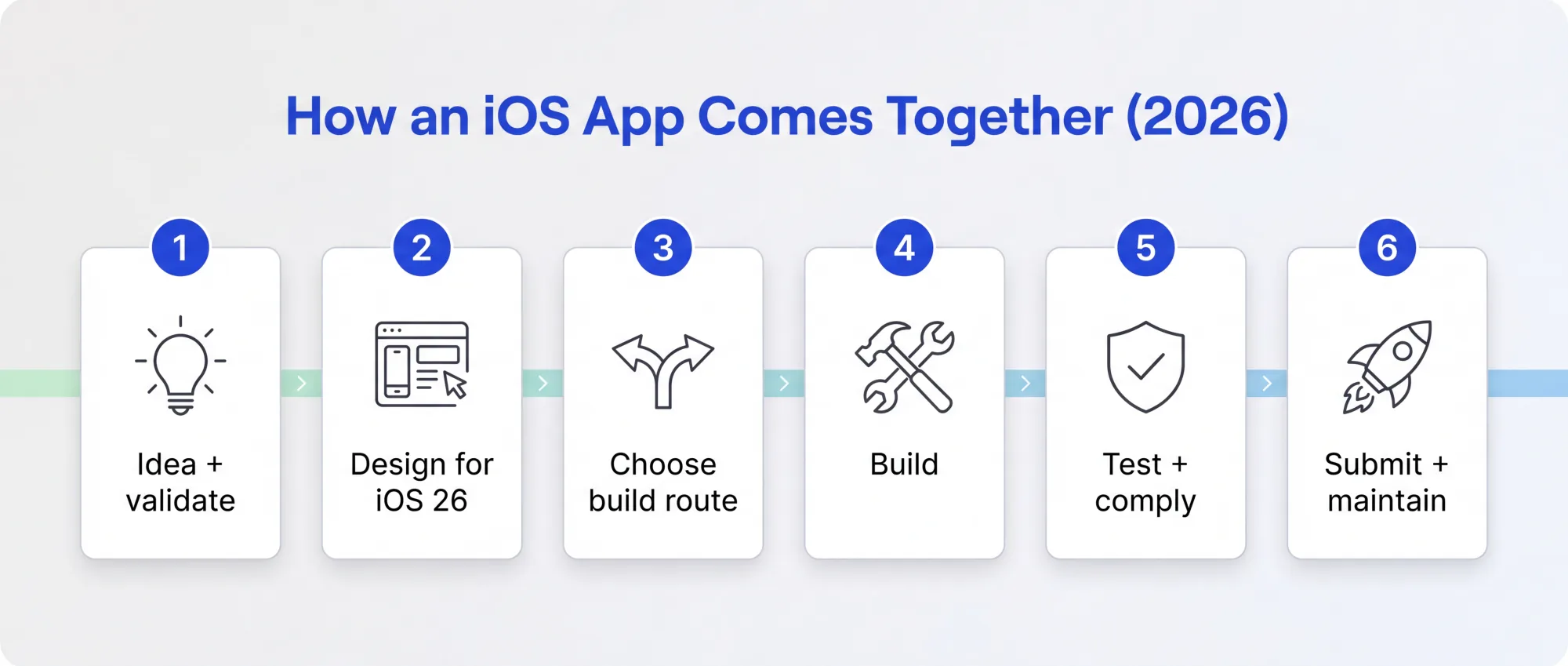
Every app starts with an idea, but in 2026 the cheapest way to get it wrong is to start building before you've checked anyone wants it. Validate first. Confirm the audience, the problem and the willingness to pay before you commit a build budget. Our App Gameplan does exactly this: a fixed-price, four-week discovery that gives you a board-ready answer on whether to build and what to build, with the fee credited if you go ahead. It's the cheapest insurance you'll buy on the whole project.
This is the biggest design change in over a decade. iOS 26, released in September 2025, introduced Liquid Glass, a translucent, refractive interface material that runs across the whole system. It's the first major redesign since iOS 7 in 2013. The top and tab bars are now translucent and can fade or collapse as the user scrolls, so a design built for the old opaque chrome looks dated immediately.
It also has a deadline. Apple is requiring apps built against the iOS 26 SDK to adopt Liquid Glass from September 2026, with only a temporary opt-out before then. So if you're designing an iOS app now, design it for Liquid Glass from the start rather than retrofitting later. We go deeper on this in our Liquid Glass guide.
Here's the decision the old version of this post missed entirely. The real choice in 2026 isn't "native iOS or a no-code builder". It's whether to build for iOS only, or build for iOS and Android together from one codebase.
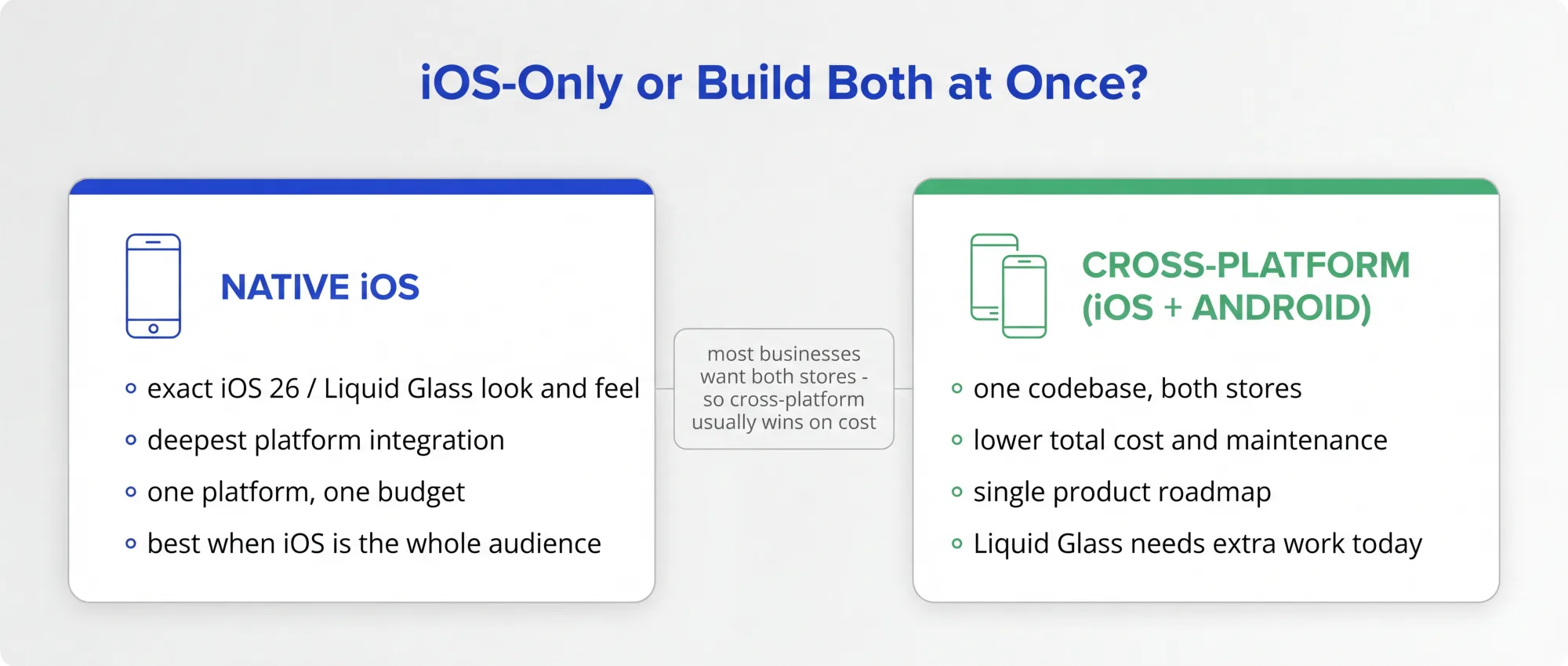
Native iOS gives you the exact iOS 26 look and feel and the deepest platform integration, and it's the right call when iOS genuinely is your whole audience or the brief is "must feel like a flagship Apple app". That's our native iOS development service. But most businesses want to reach Android users too, and building twice is the most expensive way to do it. A cross-platform codebase lets one team and one budget cover both stores, which is our Flutter app development service. The honest caveat: cross-platform doesn't get Liquid Glass for free yet, so a pixel-perfect glass UI currently needs some extra native work. Weigh the reach and cost saving against that, and for most businesses cross-platform wins.
For native iOS, the 2026 toolchain is Xcode 26 and Swift 6.x, and Xcode now ships with built-in AI coding assistance. The genuinely new capability worth designing in is on-device AI. Apple's Foundation Models framework gives you direct access, in a few lines of Swift, to the same on-device model that powers Apple Intelligence. It runs privately on the device, works offline, and costs nothing per call, so features like summarisation, classification or smart replies no longer carry a metered cloud bill. As of 2026 it also handles image input. This is a real shift from the era where every AI feature was an expensive API call, and building these features properly is what our AI app development service focuses on.
Test thoroughly, then clear the gate that catches a lot of teams: the privacy manifest. Every iOS app, and every third-party SDK it bundles, needs a `PrivacyInfo.xcprivacy` file declaring the data it collects and the approved reasons for using "required reason" APIs. Apple has rejected non-compliant apps since May 2024, and it's now firmly enforced. The most common rejection causes in 2026 are app completeness issues (crashes, placeholder content) and missing privacy documentation, both entirely avoidable with proper pre-submission checks.
You'll need the Apple Developer Program, which is about £79 a year in the UK ($99 USD). Review is fast now: most submissions clear in 24 to 48 hours, though first-time apps and major updates can take up to 72. If you sell through the app, Apple's commission is 15% under the Small Business Program (for developers earning under $1M a year, plus all new developers) and 30% above, so the old flat 30% no longer applies to most. There's more detail in our iOS app distribution guide and on the fee structure in our App Store fees piece.
An iOS app is not a one-off build. Apple runs an annual OS cycle, Liquid Glass adoption is now expected, and there's a steady stream of SDK and privacy updates to keep up with. An app that stops being maintained falls behind quickly and, increasingly, gets pulled. We offer app support and maintenance as a continuing relationship precisely because this is ongoing work, not a finishing line. Budget for it from day one.
Creating an iOS app in 2026 means: validate the idea cheaply, design for Liquid Glass from the start, decide early whether you also want Android (you probably do), build with on-device AI where it helps, get the privacy manifest right so you're not rejected, and commit to maintaining it. None of it is hard with the right team, and most of the failure modes are avoidable.
If you'd like help turning an idea into a real iOS app, or working out whether to go native or cross-platform, get in touch. We'll give you a straight answer.
How much does it cost to create an iOS app?
It depends on complexity, but the Apple Developer Program is about £79 a year, and the build itself ranges widely. We cover real UK figures in our guide to how much it costs to build an app. The biggest cost lever is scope, so validating what to build first usually saves the most.
Do I need to use Swift to build an iOS app?
For a fully native iOS app, yes, Swift with Xcode. But you can also build for iOS (and Android at the same time) with a cross-platform toolkit from a single codebase, which is often more cost-effective if you want both stores. Native is the right call when you need the exact iOS 26 look and deepest integration.
What is Liquid Glass and do I have to support it?
Liquid Glass is iOS 26's translucent new design language, the first major redesign since iOS 7. Apple is requiring apps built against the iOS 26 SDK to adopt it from September 2026, so new iOS apps should be designed for it from the start.
Why do iOS apps get rejected?
Most often for completeness issues (crashes, placeholder content, broken features) and missing privacy documentation, especially an incomplete privacy manifest. Review itself is fast, usually 24 to 48 hours; rejections are common but almost always avoidable with proper checks before you submit.