Opinion
11 Steps to a Successful Flutter App Launch (2026 Update)

June 14, 2026
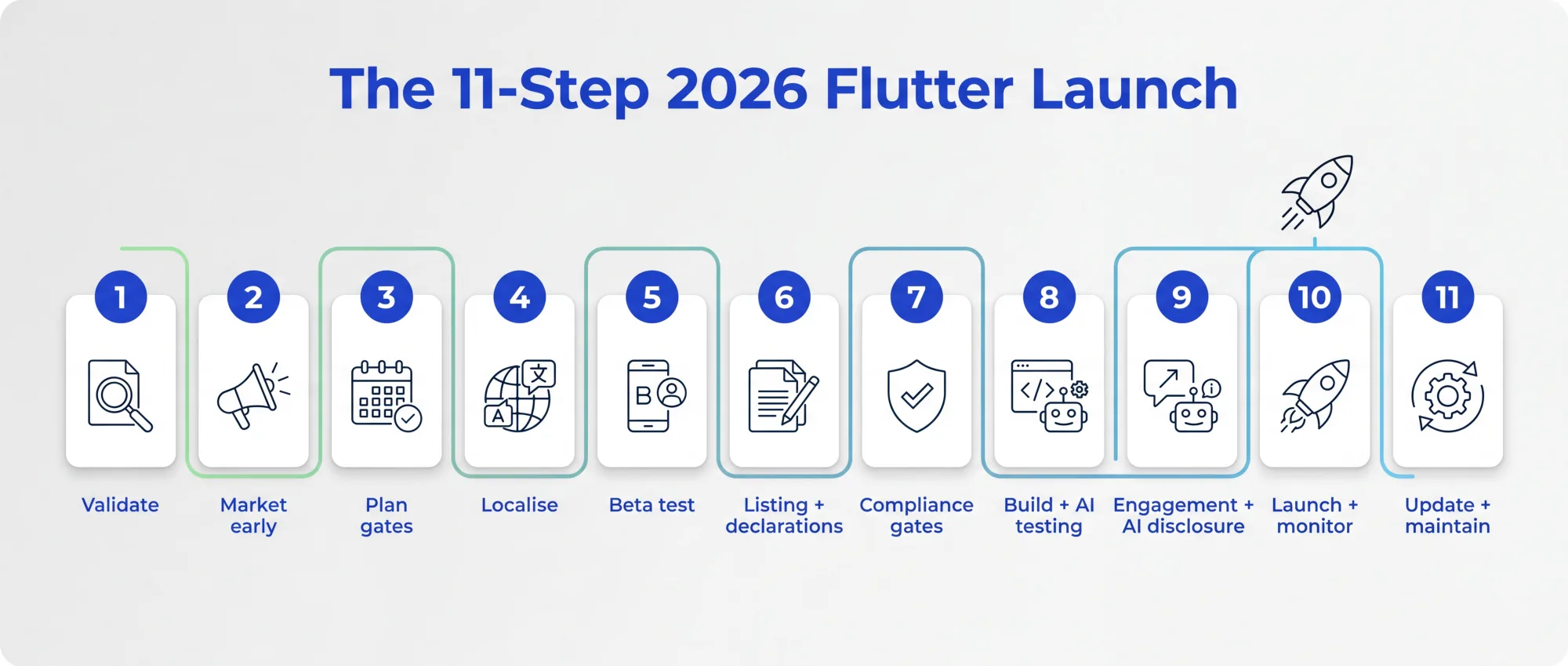
Launching a Flutter app in 2026 is as much a compliance and quality test as a marketing exercise. Apple and Google spent the last two years tightening the gates: mandatory privacy manifests, new age ratings, AI-disclosure rules, a two-week testing requirement on Google Play, and Apple setting out when it removes apps that nobody maintains. These 11 steps cover what it actually takes to get approved and stay live, not just get noticed.
I'm Gareth, CTO at Foresight Mobile. We launch Flutter apps for a living, and the launch checklist looks very different to the one in the 2024 version of this post. The marketing fundamentals still hold, but they're no longer the hard part. Getting past review, and staying on the store afterwards, is. Current stable is Flutter 3.44 with Dart 3.12, and Impeller is now the default renderer on both platforms, which removes the old first-run animation stutter and gives you a smoother launch out of the box. Here's the run-through.
Flutter lets you ship one codebase to iOS and Android, which is the cost case we make on our Flutter app development service. But one codebase doesn't exempt you from each store's rules, and in 2026 those rules decide whether you launch on time or sit in review for weeks. The single most useful mindset shift: treat your launch as a sequence of gates to clear, not a single submit button.
The old advice to "research your market" still holds, but in 2026 the cheapest way to get it wrong is to skip straight to building. Confirm there's a real audience and a real problem before you write production code. This is exactly what our App Gameplan is for: a fixed-price, four-week process that gives you a board-ready answer on what to build and whether it's worth it, with the fee credited if you proceed. A launch that succeeds usually started with a validated idea, not a hunch.
Build a little anticipation before launch day: a landing page, a waitlist, some content, a presence wherever your audience already is. None of this changed much, and it still works. Just keep it proportionate; the heavy lifting in 2026 is on the compliance side, so don't over-invest here at the expense of the gates below.
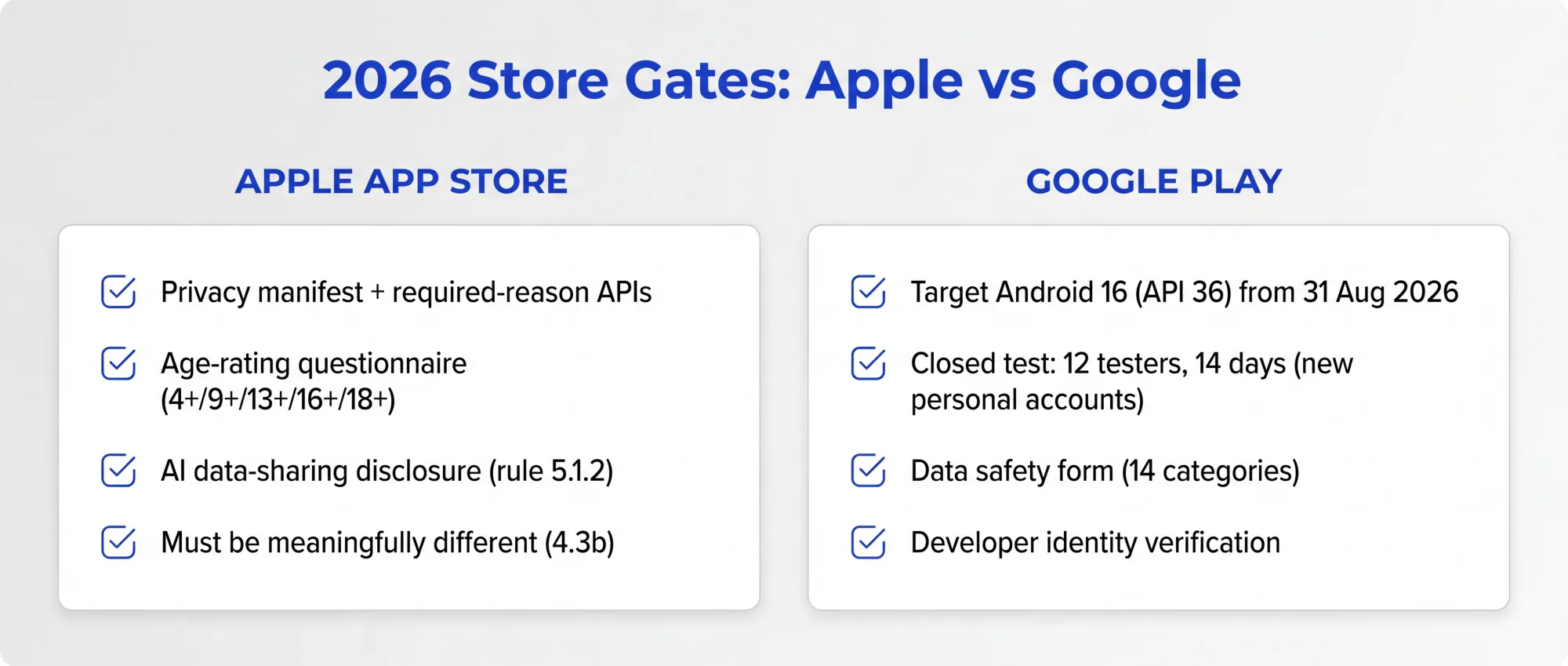
This is where 2026 bites first-time publishers. Two hard constraints you must build into the schedule: if you're on a new personal Google Play account, you need a closed test running for at least 14 days before you can even apply for production, and Apple won't accept app updates at all until you've completed the new age-rating questionnaire. Neither is something you can rush at the end. Put them on the plan early.
If you're targeting more than one region, localise the app and the store listing properly: language, currency, date formats, and culturally appropriate imagery. Flutter's internationalisation support makes this manageable from one codebase. Prioritise the markets where you actually expect users rather than translating into everything at once.
Beta testing now does double duty. Use TestFlight on iOS (up to 10,000 external testers) and Google Play's closed testing track on Android. On Play, new personal accounts must keep at least 12 real testers opted in for 14 continuous days, on genuine devices, with evidence you acted on their feedback. So the beta you'd run anyway for quality also clears a mandatory launch gate. Plan it as one activity, not two.
A good listing (clear screenshots, a sharp description, the right keywords) still matters for discovery. But in 2026 the listing isn't complete without two declarations that block submission if missing: Apple's age-rating questionnaire and Google Play's Data safety form, which covers 14 data categories and is now checked automatically against your app binary. If your app accesses data you didn't declare, you're flagged before a human even looks. Treat these as listing prerequisites, not afterthoughts.
This is the step that didn't exist in the old post and now matters most.
On Apple, you need a privacy manifest (`PrivacyInfo.xcprivacy`) declaring approved reasons for any "required reason" APIs your app or its plugins touch. This is where Flutter teams get caught: a single non-compliant plugin can block your launch, because the app's manifest has to aggregate every SDK's declarations. On Google, new apps must target Android 15 (API 35) now, and Android 16 (API 36) from 31 August 2026, so your toolchain has to stay current or you lose the ability to ship updates. We deal with this plumbing daily, and it's the kind of detail our Flutter service exists to get right.
Your test suite still rests on Flutter's `flutter test`, `integration_test` and golden tests. What's new in 2026 is the AI layer on top. Tools like Maestro run end-to-end tests against your compiled app with no instrumentation, and its AI-assisted authoring (including an MCP server you can drive with an assistant like Claude) can cut test-creation time dramatically. Used well, AI is a force-multiplier on coverage before submission. It doesn't replace a real test strategy; it lets a small team get broader coverage faster. Ship with confidence, not hope.
Onboarding, push notifications and a reason to come back all belong here. One 2026 addition: if your app shares personal data with a third-party AI, Apple's guideline 5.1.2(i) requires you to name the provider (OpenAI, Google, Anthropic) and get explicit consent first. Generic "we may share data with service providers" wording will get you rejected. If you're using AI features, build the disclosure in from the start rather than bolting it on at review.
Submit, launch, and then actually watch what happens. Crash rates, ANRs, retention and reviews aren't just vanity metrics in 2026. Apple removes an app that crashes on launch straight away, and one with no update in three years and very few downloads gets 90 days' notice. In crowded categories such as dating or wallpaper apps, Guideline 4.3(b) also lets Apple remove apps that aren't updated, improved or attracting customers. Poor quality metrics can get an app removed, as well as holding back growth. Keep an eye on the numbers from day one.
The old "keep it fresh" advice became a hard requirement. Between annual target-API bumps, OS updates, privacy-manifest and SDK upkeep, and Apple's policy of removing apps that nobody maintains, "ship and forget" is a route to getting pulled from the store. A launched app is a living thing that needs ongoing care, which is exactly why we offer app support and maintenance as a continuing relationship rather than a one-off. Budget for it from the start.
A successful Flutter launch in 2026 is roughly 30% marketing and 70% clearing gates and staying compliant. Validate first, plan the two-week and questionnaire deadlines into your timeline, get the privacy and data-safety declarations right, lean on AI to test broadly, and commit to maintaining the app after launch. Do that and the launch itself becomes the calm part.
If you want a deeper reference for the store-specific detail, we have full guides to iOS app distribution and Android app publishing for 2026. Or get in touch and we'll help you plan the launch properly.
What do I need to launch a Flutter app on the App Store in 2026?
A privacy manifest declaring your required-reason API usage (including those from plugins), a completed age-rating questionnaire, AI data-sharing disclosure if relevant, and an app that's meaningfully different from what's already there. Apple also removes published apps that go three years without an update and get very few downloads, so plan to maintain it.
How long does a Google Play launch take with the new testing rules?
If you're on a personal developer account created after November 2023, budget at least two extra weeks: you must run a closed test with 12 real testers opted in for 14 continuous days before you can apply for production access. Organisation accounts are exempt.
Does AI help with launching an app?
Yes, mainly in testing. AI-assisted tools like Maestro can generate and run end-to-end tests quickly, broadening your coverage before submission. It complements Flutter's own test framework rather than replacing it. AI doesn't remove the compliance steps.
What's the most common reason a Flutter app gets rejected?
Compliance gaps, especially a missing or incomplete privacy manifest (often caused by a single non-compliant plugin) and incomplete Data safety declarations on Google Play. These are avoidable with the right pre-submission checks.